What Is Shared Hosting?
Shared hosting is a web hosting plan in which multiple websites run on one server and split its CPU, RAM, storage, and bandwidth. Because the cost of running the server is spread across many customers, shared hosting is typically the cheapest way to host a website.
More About Shared Hosting
Shared hosting puts many customer websites on one physical server. Each site gets a limited share of the machine's CPU, RAM, disk space, and bandwidth.
It's usually the cheapest tier a host sells, but plans differ in more than price. Compare storage, bandwidth allowance, the number of websites allowed, email accounts, and whether SSL certificates and backups are included.
How shared hosting works
A hosting company loads many customer accounts onto a single server, and every account draws from the same pool of CPU, RAM, and storage, often behind one shared IP address. The host keeps each account walled off from its neighbors and takes care of the machine itself: hardware, operating system, and security patches. You manage only your own site, usually through a control panel.
That pool has limits. If your site exceeds its allotment during a traffic surge, the host throttles it, so pages load slowly or return temporary errors until usage drops. Check your plan's usage limits before you hit them, not after.
Shared vs. VPS vs. dedicated hosting
The main hosting tiers differ in what's guaranteed to you, how much admin work you take on, and what you pay:
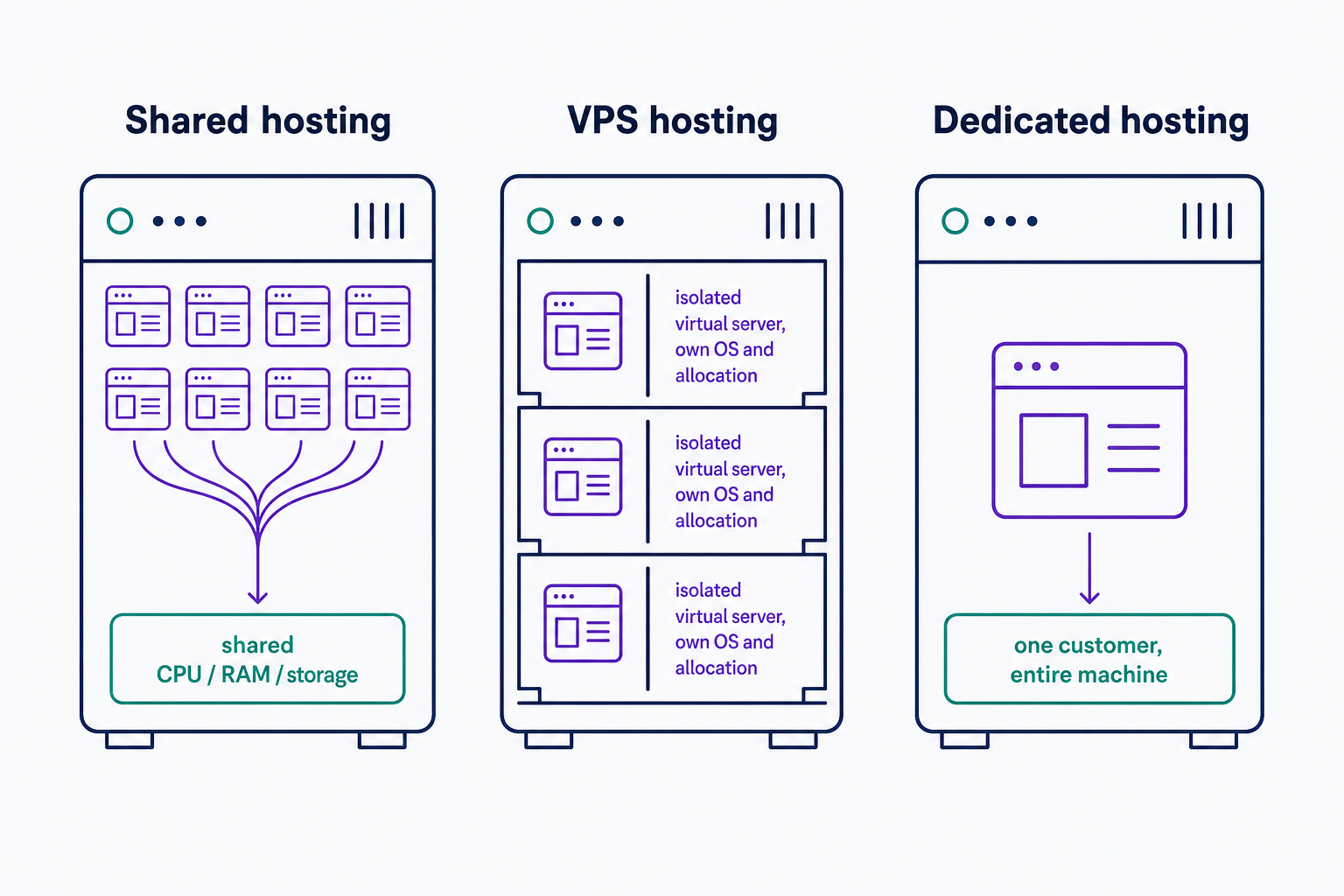
- Shared hosting: many sites on one server, separated by the host's software but with no guaranteed slice of CPU or RAM. Lowest price, and the host does the server administration.
- VPS hosting: one physical server divided into isolated virtual servers, each running its own operating system with its own virtual allocation of computing power and memory. RAM is commonly a fixed amount, but CPU guarantees vary by plan: vCPUs can be dedicated, shared, or capped. Mid-range price; basic server skills help, though managed plans exist.
- Dedicated hosting: an entire physical server to yourself, with all of its CPU, RAM, and storage guaranteed to you. The top price tier and the most admin responsibility.
- Cloud hosting: your site runs across multiple virtual servers instead of one machine, so another server can step in if one fails and capacity scales when traffic jumps. You typically pay for what you use rather than a flat monthly price.
Shopping for a VPS specifically? Compare whether the vCPUs are dedicated or shared, how much RAM the plan allocates, who manages the server, and what usage limits apply. For a full side-by-side, read VPS vs. Shared Hosting: 7 Key Differences and How To Choose.
When to upgrade from shared hosting
Shared hosting fits blogs, portfolios, and small-business sites with modest, steady traffic. There's no universal page-view ceiling: what a plan can absorb depends on its usage limits, your caching, how heavy each page is, and how much database work every visit triggers.
So upgrade on symptoms, not on a visitor count: sustained throttling, CPU or memory allowances you keep exhausting, unplanned downtime, traffic spikes your plan can't handle, or server settings you need but can't change. The alternatives aren't a ladder you must climb in order. A VPS adds isolation and control, managed WordPress hosting hands the server work to the host, cloud hosting absorbs spiky traffic, and a dedicated server suits sustained heavy load.
Two guides go deeper: 5 Signs Your Website Needs a VPS Upgrade and Managed WordPress Hosting vs. Shared Hosting: Which Does Your Site Need?. If you're comparing hosts rather than tiers, our entry product is DreamHost web hosting.
Shared hosting risks and how to reduce them
The low price buys you neighbors, and neighbors bring two separate risks. A security hole in one tenant's site can expose others on the same machine, and a neighbor's traffic spike can slow your pages down (the "noisy neighbor" problem). Both trace back to the same fact: every account runs on the same hardware.
Each threat has its own control. Host-enforced account and process isolation limits cross-account exposure. Per-account caps on CPU and memory use keep a noisy neighbor from eating your share. Keeping your CMS, themes, and plugins updated, and scanning for malware, protects your own site from compromise. An SSL/TLS certificate matters too, but for a different job: it encrypts traffic between your site and its visitors, and it does nothing to separate you from your neighbors.
Before you buy, ask the host how it isolates accounts and what per-account limits it enforces. If you keep bumping into those limits anyway, stop tuning and change plans.
Frequently Asked Questions
- There's no standard number, and most hosts don't publish theirs. One provider on the Web Hosting Talk forum (December 2022) reported 800 to 1,500 domains, roughly 400 customer accounts, on a single server. Your plan's per-account limits matter more than the raw count.
- Yes, for most small-business sites, if the host isolates accounts and you keep software updated. If you take payments, check whether a hosted processor handles card data and whether your host offers PCI support, backups, and patching. A VPS makes sense only when you need stronger isolation or custom controls.
- Shared hosting is the entry tier. In CNET's May 2024 hosting guide, shared plans typically start at $2 to $5 per month (often $10 to $20 on renewal), VPS plans at about $30, and dedicated servers at $80 or more. Compare what's guaranteed at each tier, not just sticker prices.
- Usually not at the server level. Shared plans support the standard software the host provides (PHP, MySQL, common CMSes), but you can't install your own server software or change server settings. If your project needs custom server software or root access, you need a VPS or dedicated server.
Web Hosting
Our Web Hosting plans offer a user-friendly interface and flexible options to fit your needs, with a 30-Day Money-Back Guarantee.
Web Hosting Plans