What is RAM?
Random Access Memory (RAM) is a computer’s short-term working memory: volatile chips holding the data and instructions the processor is actively using, cleared when power is removed. In web hosting, available RAM limits how many processes and simultaneous visitors a server can handle at once; unlike disk storage, RAM doesn’t hold permanent files.
More About RAM
RAM is where a computer — or the server hosting your website — keeps everything it's actively working on. Files and programs live permanently on disk; when they're needed, they're loaded into RAM so the processor can work on them at full speed. On a web server, that means the operating system, the web server software, PHP workers, database queries, and every visitor request being handled at that moment all occupy RAM while they run.
DRAM architecture
A DRAM chip — the type of RAM used as a computer's or server's main memory — contains up to billions of microscopic cells, each pairing a capacitor that stores an electrical charge with an access transistor. (The other main type, SRAM, stores bits in transistor flip-flops instead and is used for CPU caches.)
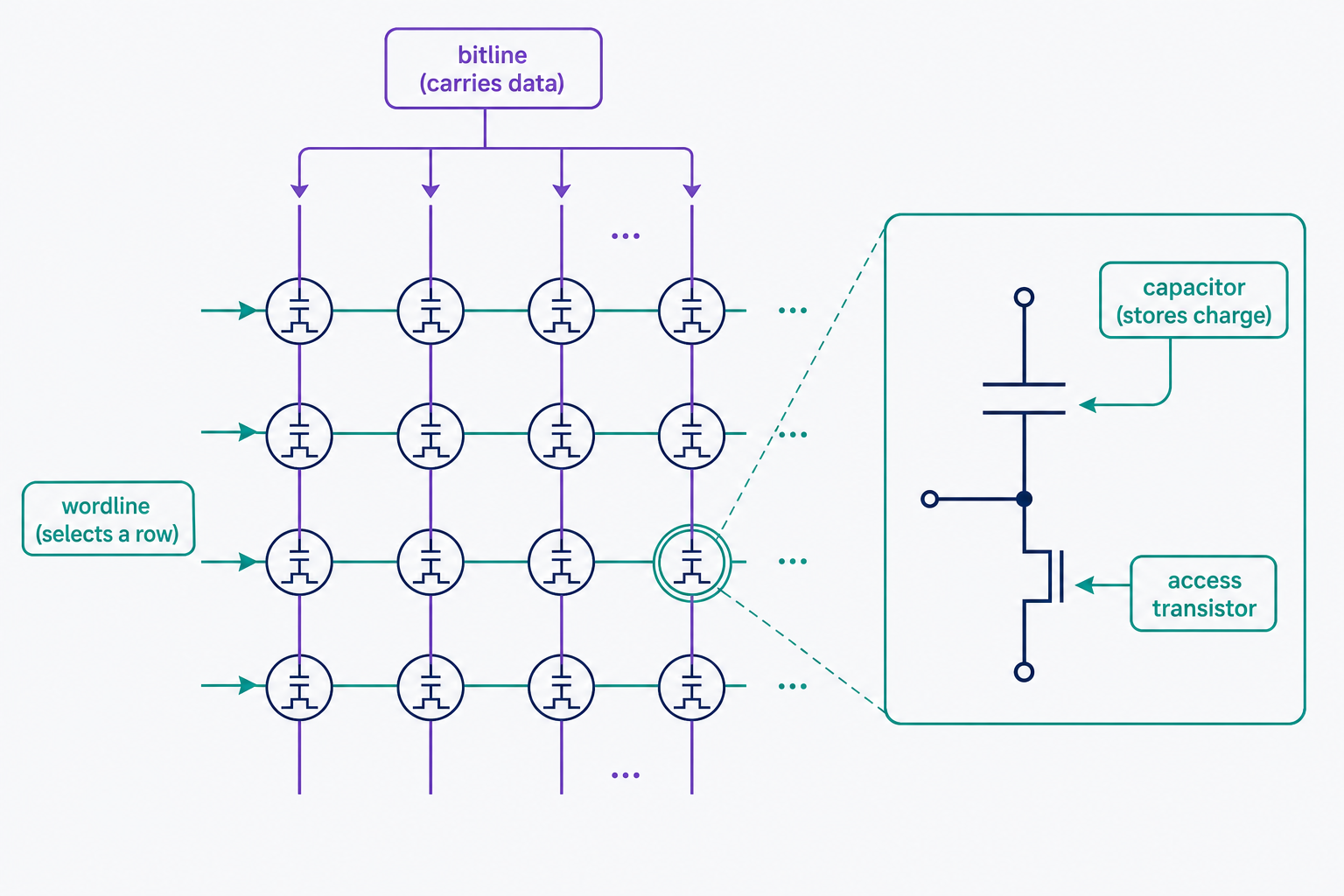
The cells are arranged in rows and columns: each row is connected to a wire called a wordline, and each column to a wire called a bitline. Wordlines and bitlines cross at right angles, and each memory cell sits at one intersection: activating a wordline selects a row of cells, and the data travels in or out on the bitlines. Because any cell can be reached directly this way, any location can be read or written in about the same time, in any order. That's the "random access" in the name.
Why RAM matters for your website
Available RAM caps how much your site can do at once. Every concurrent visitor request is handled by processes that live in RAM, so memory use climbs with traffic — but RAM isn't always the first resource to run out. Depending on the workload, CPU, PHP worker limits, or disk I/O can hit their ceiling before memory does, so check real measurements before deciding which one needs attention. On a typical WordPress server, RAM holds Linux, Nginx or Apache, the PHP workers that build your pages, the MySQL database answering queries, and often an object cache such as Redis or Memcached, which lives entirely in memory because memory is what's fast. When RAM is the resource that fills up, the server slows down or starts refusing requests.
RAM vs. disk space
RAM and disk space are both measured in gigabytes, but that's where the similarity ends — they do different jobs:
- RAM: fast, temporary, and volatile. It holds the programs and data in active use, and it empties at every reboot or power-off.
- Disk space: slower but persistent. It holds your site's files, databases, and operating system at rest, and keeps them through restarts.
The two work as a pipeline: your site's files live on disk, and the server loads them into RAM whenever it needs to serve them.
RAM vs. ROM
ROM (read-only memory) is RAM's other classic counterpart, and the difference is purpose, not just persistence:
- RAM: writable working memory. Its contents change constantly while a device runs — programs load in, data gets processed — and it empties when power is removed.
- ROM: permanent instruction storage. It holds firmware, the built-in startup code a computer, router, or phone needs before anything else can load. It's written at manufacture, updated rarely if ever, and keeps its contents without power.
ROM isn't the same as an SSD or hard drive, either: all of them keep data without power, but ROM carries a device's own firmware, while disk storage holds the files, applications, and operating system you install and change.
Website RAM sizing
A small, well-cached WordPress site can run in about 1 GB of RAM, and most production sites sit comfortably in the 2–8 GB range typical of VPS hosting plans. What pushes the number up is concurrent traffic, plugin count, database size, and how much caching you do — not how many pages you've published. As a reference point, DreamHost VPS hosting plans ship with 4 GB, 8 GB, 16 GB, or 32 GB of RAM as of July 2026.
Don't size by raw "used" memory usage, though. Linux borrows idle RAM for disk caching and hands it back the moment applications ask, so a healthy server routinely looks nearly full. The figure that matters is the "available" column reported by free -m: an estimate of how much memory programs could still claim without swapping. Watch it during sustained peak traffic, and treat memory as genuinely tight only when other signals corroborate it — swap use growing, out-of-memory kills in the logs, processes dying, response times climbing, or resource alerts from your host. When pressure appears occasionally, optimize first: caching and trimming heavy plugins cut memory demand. When it returns at every peak after that, move up a tier.
When a server runs out of RAM
How a server fails when RAM runs out depends on whether swap space is configured. With swap, the operating system parks less-used memory on disk to free space, and the site slows sharply — disk is far slower than RAM, so sustained swapping stretches response times from milliseconds into seconds. With little or no swap, there's no slow-motion phase: the kernel's out-of-memory (OOM) killer terminates processes outright to reclaim memory, and a large process like MySQL is a common casualty — visitors see crashes and 500 errors. To tell which you're facing, check swap activity with free -m and look for "Out of memory" entries in the kernel log.
The PHP "memory exhausted" error WordPress owners often meet is a separate condition: it means a single PHP process hit its own memory_limit — a per-process cap — not that the whole server ran out of RAM. For that, find the plugin or theme eating the allocation or raise the limit; our guide to fixing the WordPress memory limit error walks through both. For genuine server-wide pressure, work in escalation order: turn on caching so fewer requests need PHP and the database at all, and move to a plan with more RAM when total usage is truly the constraint.
Volatile vs. non-volatile RAM
RAM is volatile, meaning it needs power to retain data. When the power is removed, the data is lost. That's why reboots aren't free: anything not yet written to disk disappears, in-memory caches like Redis and Memcached come back empty and have to rebuild, and databases write every committed change to disk precisely so it survives. Non-volatile RAM (NVRAM) is a type of RAM that retains its stored data without applied power. Don't confuse it with the flash memory in SSDs and USB drives, though: flash is persistent storage, not working memory, and it sits on the disk side of the RAM-versus-disk divide.
Frequently Asked Questions
- Run free -m or top over SSH on a VPS or dedicated server. Elsewhere, visibility varies by host: check your panel for account-level memory metrics (different from PHP's per-process memory_limit), and contact your host if usage isn't exposed anywhere.
- No. The PHP memory limit caps how much a single PHP process may use within the server's total RAM. Raising it doesn't add memory, and setting it too high lets one runaway process starve everything else on the server.
- Sometimes. Extra RAM lets Linux cache more files and lets you run more simultaneous PHP workers, but it won't speed up a single request that's limited by CPU, disk I/O, or database queries. If pages are slow even with one visitor, more RAM won't help — profile the request instead.
Web Hosting
Our Web Hosting plans offer a user-friendly interface and flexible options to fit your needs, with a 30-Day Money-Back Guarantee.
Web Hosting Plans