What Is a Server?
A server is a computer or software program that provides data, resources, or services to other computers, called clients, over a network. A web server is a common type: it stores a website’s files and delivers its pages over HTTP to any browser that requests them. Every website you visit runs on one.
More About Servers
How a web server handles a request
When you type a URL into your browser’s address bar, a short chain of events delivers the page, usually in well under a second:
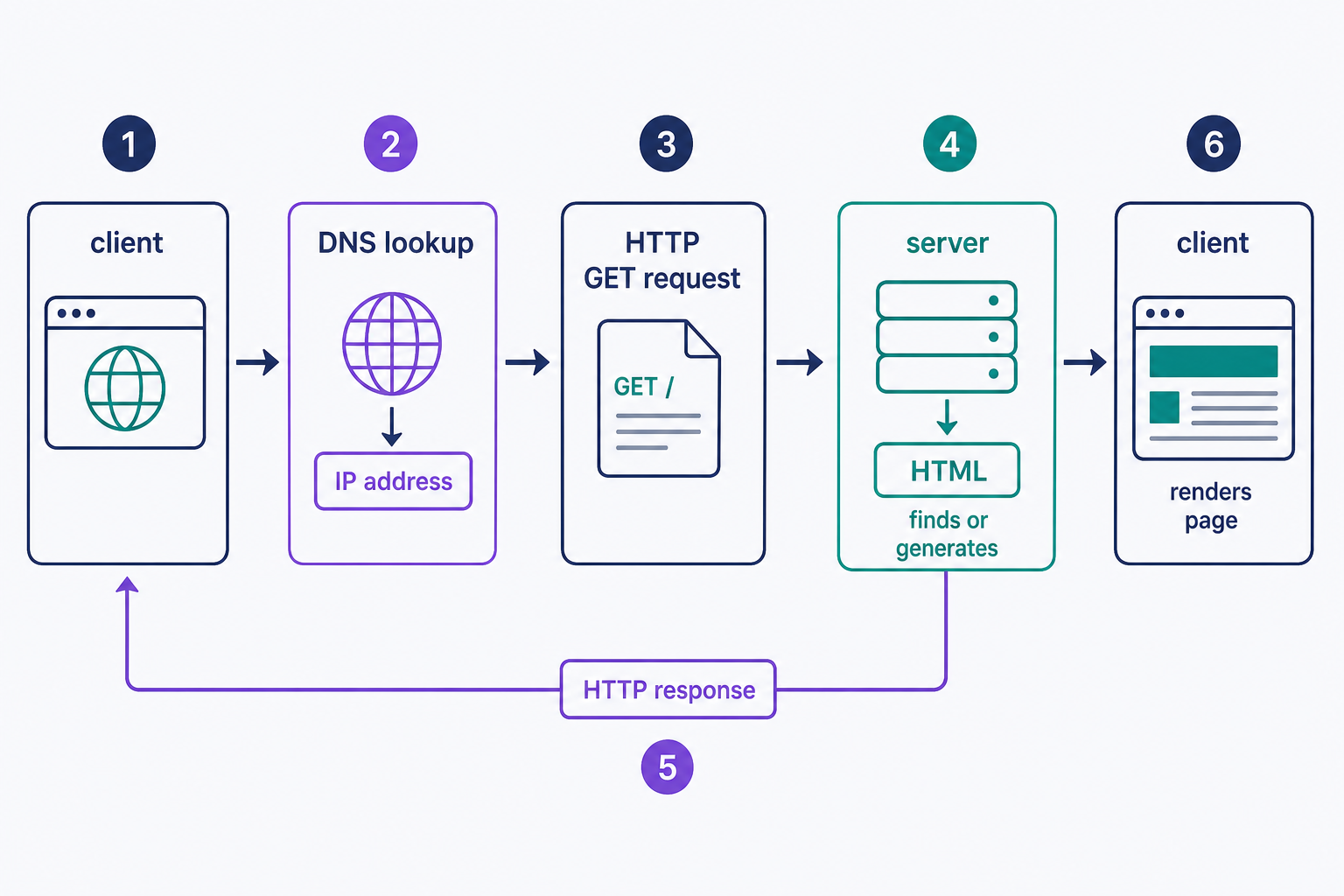
- Your browser looks up the domain in DNS, the internet’s directory, and gets back the server’s IP address, such as 203.0.113.10.
- The browser connects to that address and sends an HTTP GET request: in effect, “send me this page.”
- The server finds or generates the page’s HTML and sends it back as a response.
- Your browser renders that HTML, fetching images, stylesheets, and scripts from the server the same way.
That exchange is the client-server model: your browser is the client, and any machine built to answer requests like these is a server.
Server hardware and server software
The word “server” names two things: the physical machine, and the software on it that answers requests. The machine is a computer built to run around the clock. The software listens on the network and responds; Apache and NGINX are the two best-known web server programs. As of 31 July 2026, W3Techs’ web server survey puts NGINX at 31.5% and Apache at 23.1% of all websites whose web server it can identify. Choosing between them for a server you manage? Our NGINX vs. Apache comparison covers when each one wins.
Where servers run, and who runs them
Most production web servers live in data centers: buildings with redundant power, cooling, and network connections, so one failed part doesn’t take websites offline. They’re usually run by hosting companies and cloud providers. In W3Techs’ web hosting provider survey (31 July 2026), the largest are Shopify, which hosts 5.3% of all websites, Hostinger with 5.1%, and Amazon with 4.5%.
You can run a server on a home computer, and it’s a fine way to learn how the pieces fit. The catch is that everything a data center provides becomes your job: uptime, security, power, and bandwidth, at 3 a.m. as well as at noon. The practical rule: run your own server to experiment, and rent one from a hosting provider for anything people need to reach reliably.
Common types of servers
Web servers are one kind among several. Servers are usually named for the service they provide:
- Web server: stores a website’s files and delivers its pages over HTTP. This page’s focus.
- Mail server: sends, receives, and stores email.
- Database server: runs a database and answers queries from applications.
- File server: stores files for a network and controls who can read or change them.
- DNS server: translates domain names into IP addresses.
- Application and proxy servers: run application code, or sit between clients and other servers to route, cache, or filter traffic.
One machine often plays several of these roles at once. A typical hosting server runs a web server, a database server, and a mail server side by side.
Servers vs. web hosting
You don’t need to buy a server to run a website. A server is the machine; hosting is the service of renting space on one from a web host. Plans differ mainly in how much of a server you get:
- Shared hosting: a slice of one server, shared with other sites. The cheapest way to get online.
- VPS hosting: a virtualized private portion of a server, with resources reserved for you.
- Dedicated server: the whole physical machine, when you need every resource it has.
- Cloud hosting: resources pooled across many machines, so capacity grows with demand.
For most new sites, a web hosting plan is the sensible starting point. From there, pick by need rather than rank: a VPS when you want reserved resources and more control, a dedicated server when you need full-machine isolation, and cloud hosting when demand is variable or spread across many machines. Either way, the server’s job never changes: answer the requests.
Frequently Asked Questions
- The server received the request but hit a problem executing it, such as a crashed script or a misconfigured file, so it couldn't build the page. It's a fault on the server's side, not your connection. See our guide to fixing the 500 internal server error.
- Yes. Web server software runs on ordinary PCs. The trade-offs: the machine must stay on 24/7, most home internet connections lack a static IP address, and security, backups, and bandwidth are all yours to manage. Most site owners rent server space instead.
- It depends on whether you rent or buy. Hosting plans bundle the hardware, power, connectivity, and maintenance into one recurring fee. Owning hardware means paying up front, plus ongoing power, cooling, bandwidth, repairs, and eventual replacement. Check a provider's current plan pricing. For most websites, renting wins.
- Not quite. Physical servers in data centers do underpin every cloud service, but cloud computing adds pooled, virtualized resources you can provision and scale on demand, rather than one fixed machine. And a private cloud can run on hardware an organization owns.
Web Hosting
Our Web Hosting plans offer a user-friendly interface and flexible options to fit your needs, with a 30-Day Money-Back Guarantee.
Web Hosting Plans