What Is a Template in WordPress?
A WordPress template controls the layout of a specific kind of page, such as a single post, static page, or archive. Classic themes define templates in PHP files. Block themes define them with block markup in HTML files, while Site Editor customizations are stored in the database and override those files.
More About Templates
Templates and template parts
A template controls a full page, while a template part is a reusable section shared by templates. Most themes include a standard set of both, though the exact files differ from theme to theme:
- Templates control the layout of a full page: the front page, a single post, a static page, an archive, or the 404 error screen.
- Template parts are reusable sections that templates share, such as the header, footer, and sidebar. Edit a template part once, and every template that includes it changes.
Our guide to custom templates and template parts walks through building both from scratch.
The template hierarchy
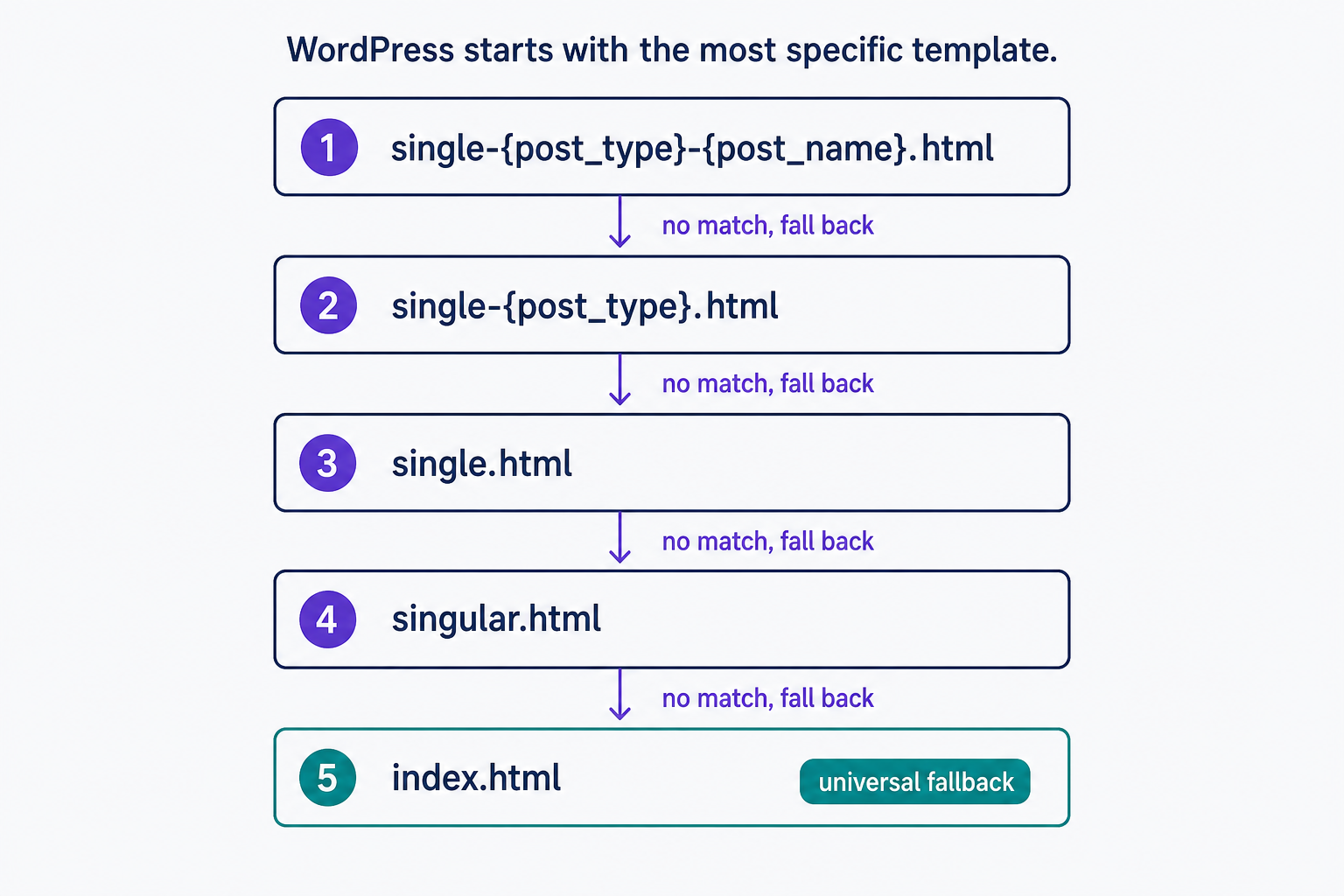
WordPress picks a template by working down a fixed fallback list called the template hierarchy, documented in the WordPress Theme Handbook. It reads the type of content requested, then searches from the most specific template to the least specific and uses the first match it finds. A single post checks single-{post_type}-{post_name}.html (the post name is the slug), then single-{post_type}.html, single.html, singular.html, and finally index.html. A post of the custom type product with the slug blue-shirt would match single-product-blue-shirt.html before any generic template. The index template is the universal fallback: it answers any request, and it's the only template a block theme is required to include. Classic themes follow the same chain with .php files.
Theme vs. template
The two words get swapped around, but they name different things:
- A theme is the complete package: every template plus the stylesheets, settings, and functions that shape your whole site.
- A template is one file inside that package, controlling the layout of one kind of page.
Switching themes replaces every template at once. Editing a template changes one layout everywhere it appears.
Templates in block themes and classic themes
Classic themes store templates as PHP files that mix HTML with PHP code. Block themes store them as HTML files of block markup in the theme's /templates folder: home.html, page.html, singular.html, archive.html, 404.html, and so on.
Block theme templates can be edited visually in the Site Editor, no code required. Templates you create or customize there are saved in the database and take priority over the theme's files, so they survive theme updates. The rule of thumb: on a block theme, edit templates in the Site Editor; on a classic theme, make changes in a child theme.
Editing template files directly
With a classic theme active, go to Appearance > Theme File Editor in your WordPress dashboard. With a block theme active, the same tool moves to Tools > Theme File Editor. You can also open the files with an FTP client; each theme keeps them in its own folder inside /wp-content/themes.
Edit carefully here. The editor keeps no backup copies, and a syntax error in a PHP template can crash your site and lock you out of the editor itself. To recover, re-upload a working copy of the file over FTP. Direct edits are also lost when the theme updates, which is why lasting changes belong in a child theme, or in the Site Editor if you run a block theme.
Frequently Asked Questions
- Open the page or post in the editor and check the settings sidebar. The Template option lists every template your theme registers for that content type. Pick one and update. Our page template entry covers the details.
- Yes. A template is a shared layout, so one edit shows up on every page or post rendered with it. To restyle a single page, assign it a different or custom template instead of editing the shared one.
- Yes. On a block theme, add a new template in the Site Editor. On a classic theme, a custom template is a PHP file you add to the theme; build it in a child theme so updates don't wipe it.
Powerful WordPress Hosting
Reliable, lightning-fast hosting solutions specifically optimized for WordPress. Find the perfect plan for you by clicking below.
WordPress Hosting Plans