What Is a Child Theme?
A child theme is a WordPress theme that inherits its design and functionality from another theme, called the parent theme. You make customizations in the child theme’s files, so the parent theme can be updated without losing your changes. For template files, WordPress uses the child’s version when one exists; files like functions.php load alongside the parent’s.
More About Child Themes
Child themes solve a specific problem in WordPress theme customization: edits made directly to a theme’s files don’t last. When the theme’s author releases an update, the update replaces those files, and your custom CSS or code goes with them.
Child themes make it possible to keep custom code and styles when the parent theme is updated. Your changes live in the child theme’s files, which parent updates never touch, so you can update the parent safely.
Child theme vs. parent theme
A parent theme is a complete, installable theme that supplies all of a site’s design and functionality on its own. A child theme is the override layer: it inherits everything from its parent by default and changes only what its own files replace.
The two work as a pair. You activate the child theme, not the parent, but the parent must stay installed: WordPress runs one active theme at a time, and the child loads everything it doesn’t override from the parent. Deleting the parent breaks the child.
How a child theme works
A child theme is its own folder inside wp-content/themes, and its style.css file is the one file it must have. That file’s header declares the relationship with a Template field that matches the parent theme’s folder name exactly. A child of the Twenty Twenty-Four default theme, for example, declares "Template: twentytwentyfour" because the parent lives at wp-content/themes/twentytwentyfour.
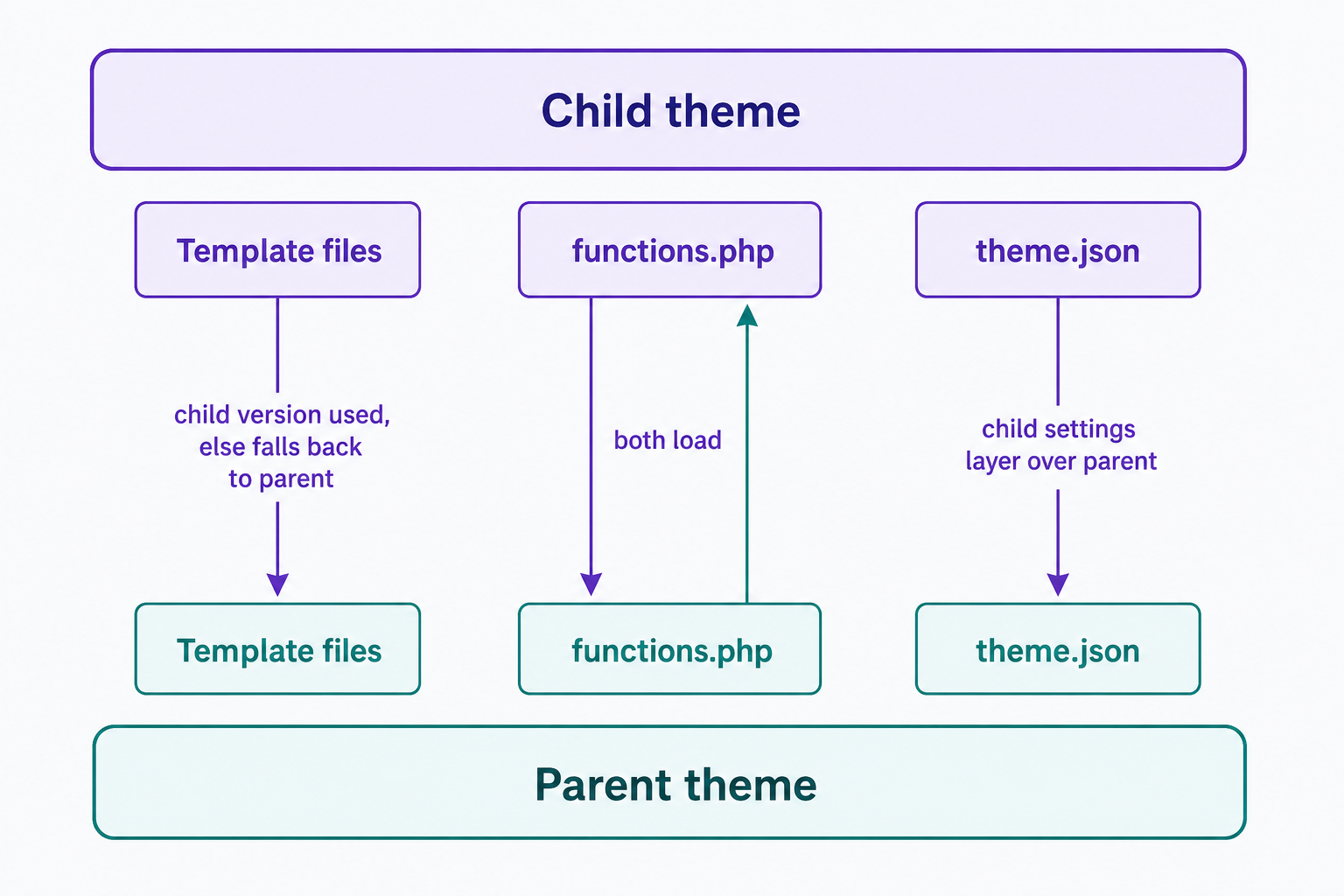
How the two themes’ files interact depends on the file. Template files follow a child-first rule: when the child provides its own version, WordPress uses it, and otherwise it falls back to the parent’s copy. Other files combine instead. A child theme’s functions.php loads in addition to the parent’s, not instead of it, and in block themes the child’s theme.json settings layer over the parent’s rather than replacing them.
How to create a child theme
The skeleton takes four steps:
- Create a new folder in wp-content/themes.
- Add a style.css file with a Theme Name and a Template header that names the parent theme’s folder.
- Check how the parent theme loads its stylesheet. The ideal parent loads both its own style.css and the child’s, but not all themes do, so many classic child themes need a small functions.php that adds the missing stylesheet.
- Test the child theme on a staging copy of your site, then activate it under Appearance > Themes.
Skipping step 3 is the most common way a new child theme goes wrong: the site loads, but without its styles. For the exact code and a full walkthrough, follow our step-by-step guide: How to Create a WordPress Child Theme.
Child themes and block themes
Child themes work with block themes too. A child of a block theme can supply its own theme.json (the file that holds a block theme’s global styles and settings), templates, and patterns, all of which layer over the parent’s. Changes you make in the Site Editor sit on top of both: WordPress stores them in the database, not in either theme’s files, so they survive updates on their own.
When you need a child theme (and when you don’t)
Use a child theme when your customization touches the theme’s files: overriding templates, changing theme.json, or adding PHP. Skip it when the change fits in the Customizer’s Additional CSS box or a code snippets plugin; those changes are stored in the database, so a theme update can’t wipe them.
For extensive rewrites, a child theme is the wrong tool: fork the original into a full theme of your own instead.
Where child themes can still break
A child theme protects your changes from parent updates; it doesn’t guarantee they’ll still fit. A major parent update can restructure or rename the very template files your child overrides, and your copies don’t update with it. So after a big parent update, compare each overridden file against the parent’s new version.
Size is the other risk. A child theme that grows to override dozens of files becomes a maintenance burden of its own. The WordPress Theme Handbook calls extensive child-theme customization a management headache and recommends forking at that point. Keep your overrides few, review them after major parent updates, and a child theme delivers what it promises: a theme you can update without fear.
Frequently Asked Questions
- No. The standard WordPress theme hierarchy has exactly two levels, parent and child, so there’s no installable grandchild theme. Parent updates never overwrite a child theme’s files, but updates to a vendor-supplied child theme can, so keep custom work in version control or a separate customization layer.
- Yes. The WordPress Theme Handbook is explicit: all themes, unless they’re child themes themselves, are technically parent themes, and authors don’t have to do anything special to support children. Any complete, installable theme can serve as a parent.
- Yes, installed and updated. The child pulls everything it doesn’t override from the parent, which shows as inactive in Appearance > Themes but is doing most of the work. Updating the parent still delivers its bug and security fixes to your site.
- It shouldn’t, but it can. A correctly set up child theme inherits the parent’s appearance, but a missing stylesheet enqueue or theme settings that don’t carry over can change styling. Preview it on a staging site and check menus, widgets, styles, and Site Editor changes first.
Powerful WordPress Hosting
Reliable, lightning-fast hosting solutions specifically optimized for WordPress. Find the perfect plan for you by clicking below.
WordPress Hosting Plans