What is functions.php in WordPress?
functions.php is a file inside a WordPress theme that holds custom PHP code. It acts much like a plugin: WordPress automatically loads the active theme’s functions.php on every page view, so any functions, features, or customizations you add there run only while that theme (or its child theme) is active.
More About functions.php
Every WordPress theme has its own folder in the wp-content/themes directory. Many themes include a functions.php file (sometimes called the theme functions file) in that folder, but it’s optional: WordPress only loads it if it exists, and the only files a theme actually requires are style.css and an index template.
How WordPress loads functions.php
WordPress loads the active theme’s functions.php automatically on every page view, on both the front end and the admin, as soon as the theme itself loads. In practice, the file acts like a plugin tied to your theme. WordPress runs the active theme’s file, plus the parent theme’s file when the active theme is a child theme. A functions.php inside any unrelated installed theme stays dormant.
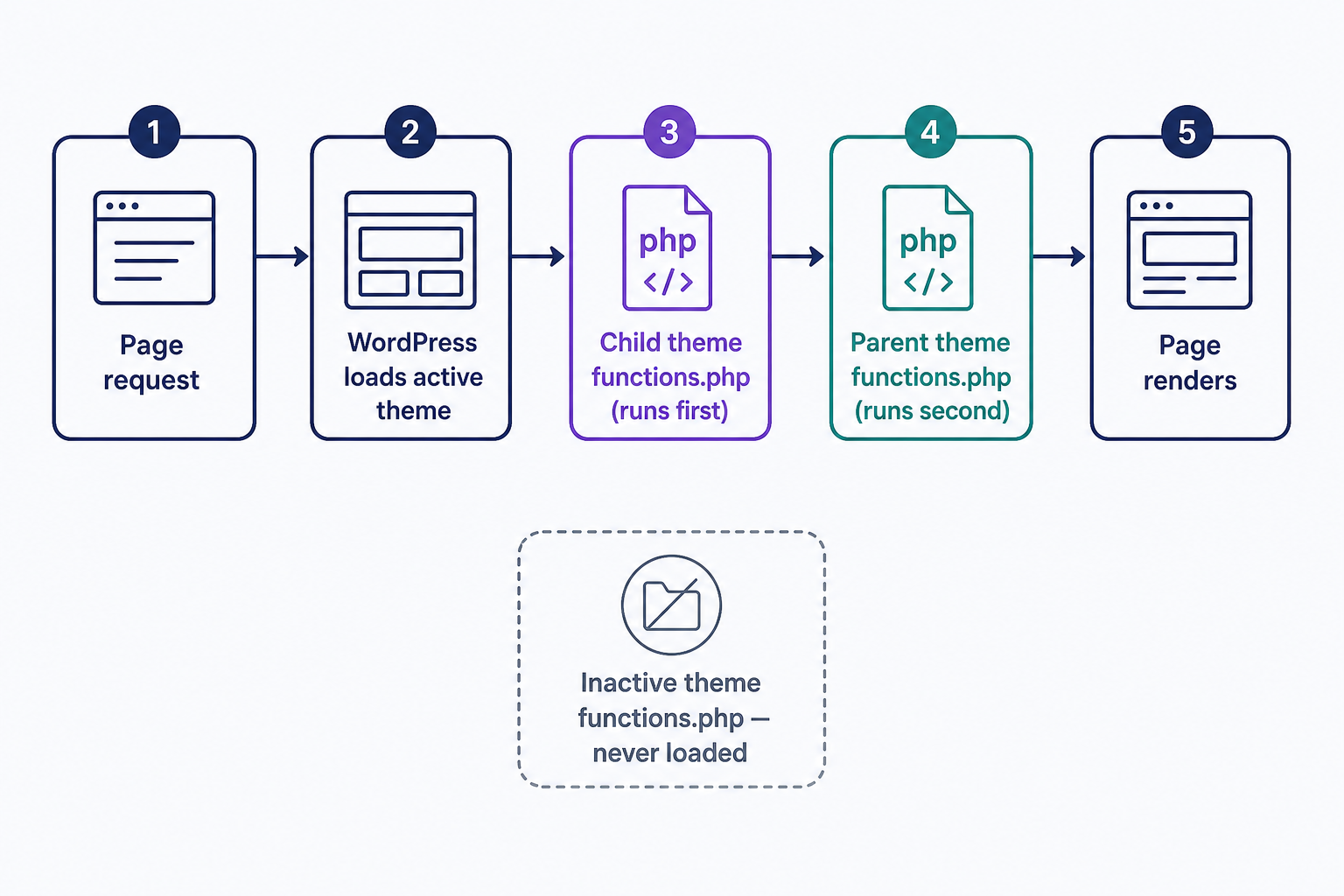
A child theme can have its own functions.php file too, but unlike template files it doesn’t replace the parent’s. WordPress loads the child theme’s functions.php just before the parent theme’s, so both run. That makes a child theme the safe home for customizations: your code survives the parent theme’s next update instead of being overwritten by it.
Common uses for functions.php
The functions.php file can hold almost any customization or feature you want to add to WordPress. The WordPress Theme Handbook names the uses you’ll see most often:
- Attaching custom functions to WordPress hooks with actions and filters
- Running a theme setup function on the after_setup_theme hook, usually to switch on features with add_theme_support()
- Loading the theme’s stylesheets and JavaScript
- Including other PHP files, so one long file can be split into smaller ones
Here’s a complete example you can paste into a child theme’s functions.php: function my_theme_setup() { add_theme_support( 'post-thumbnails' ); } add_action( 'after_setup_theme', 'my_theme_setup' );. The function switches on featured image (post thumbnail) support for the theme. The add_action() call tells WordPress to run it as soon as the theme loads.
functions.php vs. plugins
The Theme Handbook’s rule of thumb is that themes should only deal with the site’s design. Anything in functions.php stops running the moment you switch themes, so features that should work no matter how the site looks belong in a plugin. Plugins are also the safer choice if you’re not comfortable editing PHP by hand.
Editing functions.php safely
You can open the file from your dashboard under Appearance → Theme File Editor, or edit it with an SFTP client or your host’s browser-based file manager. Back up the file before you change anything, and make your edits in a child theme’s functions.php: code added to a parent theme’s file is wiped out by the theme’s next update. Our guide to the WordPress theme editor covers how to edit theme files safely.
Recovering from a functions.php mistake
Because functions.php runs on every page load, a single PHP syntax error in it can take down your entire site, front end and admin alike, behind WordPress’s “There has been a critical error on this website” screen. Since WordPress 5.2 (released May 2019), WordPress emails the site’s admin address a link to recovery mode, which pauses the broken theme so you can log in and undo the change. If the email doesn’t arrive, connect over SFTP and restore your backup copy of the file.
For a deeper walkthrough of what the file can do and how to add your own code, read our guide: Everything You Need to Know About the WordPress functions.php File.
Frequently Asked Questions
- For most one-off snippets, yes. A code snippets plugin runs the same PHP but keeps your snippets when you switch or update themes, and most validate a snippet before it runs. Edit functions.php directly when the code genuinely belongs to the theme, like a theme setup function.
- No. A theme works without it, and block themes often barely use it. If you need the file, create it in a child theme's folder and WordPress loads it as soon as it exists. Adding it directly to a theme you don't maintain risks losing it on the next update.
- No. wp-config.php sits in the root of your WordPress file directory and holds the site's base configuration, including its database connection details. functions.php belongs to a single theme and holds that theme's custom code. Switching themes changes which functions.php runs; wp-config.php stays put.
Powerful WordPress Hosting
Reliable, lightning-fast hosting solutions specifically optimized for WordPress. Find the perfect plan for you by clicking below.
WordPress Hosting Plans