What Are Cookies?
Cookies are small pieces of data a website stores in the browser, created by a server’s Set-Cookie header or by JavaScript. The browser sends matching cookies back with later requests, which lets a site remember you between otherwise stateless HTTP requests. Sites use cookies for login sessions, saved preferences, analytics measurement, and cross-site ad tracking.
More About Cookies
Cookies exist because websites needed a way to remember visitors. Netscape engineer Lou Montulli invented them in 1994 after another Netscape team needed a working shopping cart, and logins, preferences, and cart contents still depend on them today.
How cookies work
A cookie starts at the web server. When your browser requests a page, the server's response can include a Set-Cookie header, and the browser saves that cookie. On later requests, the browser returns only the cookies that match: Domain and Path control which URLs a cookie accompanies, its expiration controls how long it lives, Secure restricts it to HTTPS connections, and SameSite decides whether it travels with cross-site requests. HTTP itself is stateless, so without cookies every request would look like a brand-new visitor.
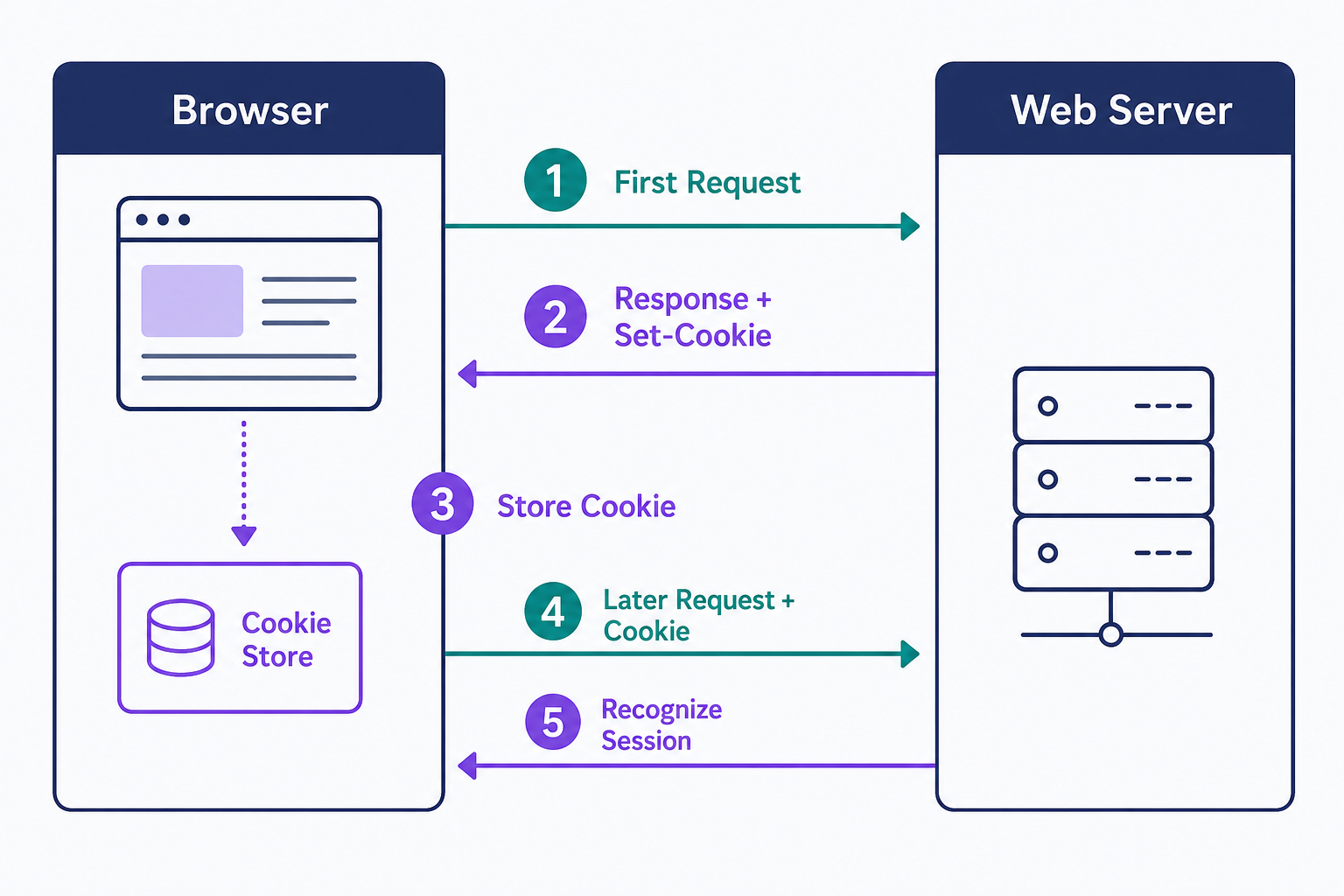
Servers aren't the only source. JavaScript in the page can create and read cookies through document.cookie, unless a cookie is marked HttpOnly, which hides it from scripts.
Signing in shows the mechanism at work. You enter your password, the server sets a cookie holding a session ID, and each matching request afterward carries that ID, so the site keeps you signed in. WordPress does exactly this with its wordpress_logged_in_* cookie. Because a session ID is effectively the key to your account, sites mark that cookie Secure and HttpOnly.
Types of cookies
Cookies split along two lines: how long they live and who sets them.
- Session cookies are deleted when you close the browser. They handle temporary state, like a checkout in progress.
- Persistent cookies stay until the date set in their Expires or Max-Age attribute. They power "remember me" logins and saved preferences.
- First-party cookies are set by the site you're visiting. They make logins, carts, and preferences work.
- Third-party cookies are set by a different domain embedded in the page, such as an ad network, and enable tracking across sites.
Cookies are small on purpose. Browsers cap each cookie at about 4 KB and allow only a few hundred per domain, so the real data lives on the server and the cookie holds just the identifier that points to it.
The third-party cookie crackdown
Third-party cookies are disappearing as a tracking tool, one browser at a time. Safari has blocked them all by default since March 2020, and Firefox has confined them to per-site "cookie jars" by default since June 2022, so a tracker embedded on two sites gets two separate cookies it can't connect.
Chrome is the holdout. Google announced a phase-out in 2020, spent years testing replacements under its Privacy Sandbox project, then reversed course in April 2025 and kept third-party cookies, blocking them by default only in Incognito mode. As of the Privacy Sandbox documentation's December 11, 2025 update, Google describes blocking as a matter of browser design, enterprise policy, or user choice, not a scheduled removal.
Cookies vs. cache
Cookies and the cache both live in your browser, but they do different jobs.
- Cookies are small pieces of data that identify you and your session. The server sets them, and your browser sends the matching ones back with its requests.
- The cache is your browser's local copy of pages, images, and scripts, kept so repeat visits load faster. It stays on your device and is never sent to the server.
Clearing them differs too. Clearing the cache costs you nothing but a slower next visit; clearing cookies costs you your logins.
Managing cookies in your browser
Every major browser still accepts first-party cookies by default, and the controls have moved on from the old "warn me before each cookie" prompts. Today you can delete cookies, block third-party cookies or all cookies, or add per-site exceptions in your browser's privacy settings.
Think before you clear everything. Deleting cookies signs you out of every site and resets carts and saved preferences, and blocking all cookies rather than just third-party ones breaks most sign-ins. If tracking is the concern, block third-party cookies and keep first-party cookies so sites still work.
Cookie laws and regulation
Cookie law differs by country, and the rules target tracking, not cookies as such.
In the United States there's no federal cookie law. The Federal Trade Commission publishes guidance and pursues deceptive tracking practices, but binding rules come mainly from state privacy laws such as California's CCPA, which lets consumers opt out of the sale or sharing of personal information collected through cookies.
In the European Union, the ePrivacy Directive and the GDPR work together: sites serving EU visitors need informed consent before setting non-essential cookies such as analytics and advertising cookies. That's why consent banners exist. Strictly necessary cookies, like the one keeping you logged in, are exempt.
If your site uses analytics or advertising cookies and serves EU visitors, the consent banner is only the visible part of the job:
- Inventory the cookies your site and its plugins actually set, and classify each one as strictly necessary or non-essential.
- Keep non-essential cookies from loading until the visitor consents, offer granular per-category choices, and make consent as easy to withdraw as it was to give.
- Document each cookie's purpose and retention period in your privacy policy, then test that declining really does block the cookies.
A consent-management plugin can run the banner and store consent records, but installing one doesn't make you compliant by itself. Verify what actually loads before consent.
Frequently Asked Questions
- It depends on the site. Necessary cookies usually power logins and checkout, but the label describes a purpose, not trustworthiness. Declining analytics and advertising cookies reduces tracking, though it can disable extras like embedded videos or personalization. Judge whether you trust the site before accepting.
- No. A cookie is plain text data, not a program, so it can't carry a virus or run code. The real danger is theft: an attacker who steals your session cookie can impersonate you until the session ends, which is why sensitive cookies restrict script and cross-site access.
- Cookies aren't the only storage. Sites can keep data in localStorage, recognize your account once you log back in, or fingerprint your browser's configuration. Clearing cookies removes one identifier; it doesn't erase server-side records or other client-side storage.
- Partly. A private window accepts cookies normally but deletes them when it closes, so tracking doesn't carry over between sessions. Your IP address and browser fingerprint stay visible, though, so private browsing limits cookie-based tracking but doesn't make you anonymous.
Web Hosting
Our Web Hosting plans offer a user-friendly interface and flexible options to fit your needs, with a 30-Day Money-Back Guarantee.
Web Hosting Plans