What is an Absolute Path?
An absolute path is the complete location of a file or directory, written from the file system’s root, like /home/user/site/index.html, so it points to the same place regardless of your current directory, unlike a relative path. On the web, the term is often used loosely for an absolute URL: a full address with protocol and domain, like https://www.dreamhost.com/hosting/.
More About Absolute Paths
Take this page’s address: https://www.dreamhost.com/glossary/domains/absolute-path/. Every part of the URL is present: the scheme (https://) tells the browser which protocol to use, the domain (www.dreamhost.com) names the server, and the path (/glossary/domains/absolute-path/) is the page’s location on that server. Strictly speaking, only that last piece is the path; when web developers call the whole address an absolute path, they mean an absolute URL. Because nothing is left for context to fill in, the full address works from anywhere: a bookmark, an email, or a link on another website.
Absolute URLs vs. relative references
How a shorter reference is read depends on where it appears. In the address bar, a partial entry like dreamhost.com is completed to a full URL. Inside a page’s links, the browser fills in the missing parts from the current page’s address, and the exact form matters:
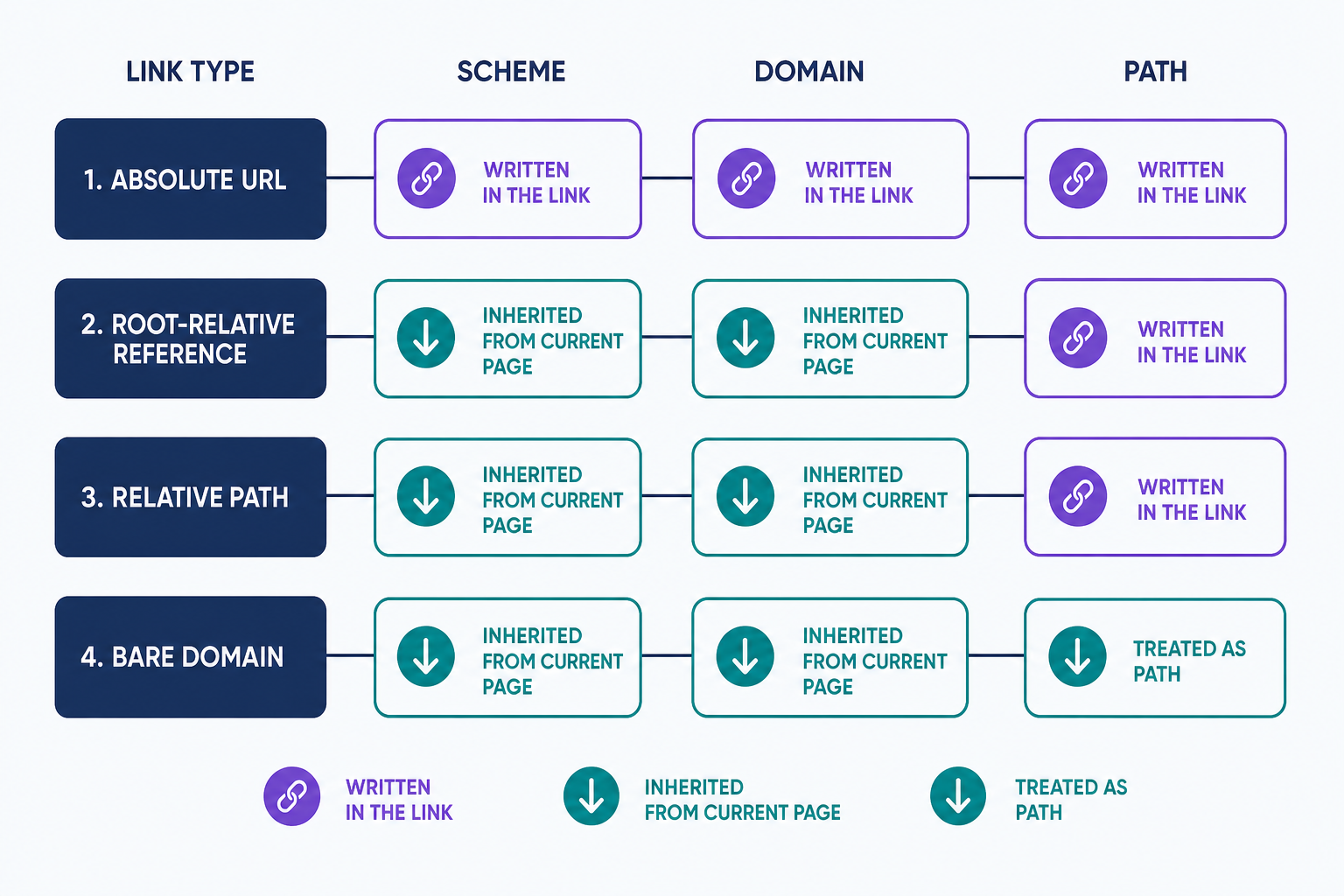
- Absolute URL (https://www.dreamhost.com/hosting/): complete with scheme and domain, so it points to the same page from anywhere.
- Relative path (shop.html): starts from the current folder, so the same link points somewhere different on every page that carries it.
- Root-relative reference (/shop): starts from the site root. Its path is absolute, but the scheme and domain still come from the page it appears on.
- Bare domain (dreamhost.com): written without a scheme, it’s just another relative path. On a page at yoursite.com/blog/post.html, a link to dreamhost.com resolves to yoursite.com/blog/dreamhost.com, a broken link.
Write links to other sites in full, https:// included. The one relative form that does cross domains is the protocol-relative reference (//example.com/style.css), which borrows its scheme from the current page. It’s a leftover from the era when sites served both HTTP and HTTPS, and it’s discouraged today: rewrite // references to https:// when you audit a site after a migration.
Absolute paths on a server
On a server, an absolute path is a file’s complete location in the file system, spelled out from the root directory. This is the term’s strict, original sense. It’s what plugins, cron jobs, and configuration files mean when they ask for an “absolute path”: the code opens the file straight from the disk, so it needs the file’s location on the server, not its web address. On DreamHost servers, your files live under /home/username/, so a site’s homepage file has an absolute path like /home/username/example.com/index.html. If you need to find one, run pwd in an SSH session to print the absolute path of your current directory.
Where a full URL is required
Some references leave the page’s context, so there’s no current address to resolve a shorter path against. A few of these are written requirements; the rest are simply the only thing that works reliably:
- Hreflang annotations: Google requires alternate URLs to be fully qualified, https:// included. A bare /es isn’t a valid alternate, so the annotation is ignored.
- XML sitemaps: the sitemaps.org protocol requires every listed URL to begin with its protocol and stay under 2,048 characters. A bare path is invalid, and search engines skip what they can’t parse.
- Links to other websites: a relative reference resolves against the current page’s site, so a full URL is the only reliable way to link to a different domain.
- Canonical tags: Google supports relative canonicals but recommends absolute paths, because one mistake here points your ranking signals at the wrong URL.
- RSS feeds: a feed is read outside your site, so a relative reference has no reliable base URL for a feed reader to resolve it against. Use full URLs for every link and image in a feed.
- HTML email: a message has no web address of its own, so a relative link or image reference has nothing to resolve against and simply breaks.
After a redesign or migration, check all six for leftover relative references, starting with the sitemap and hreflang, where a mistake costs indexing rather than a single click. For ordinary links within your own site, relative and root-relative references work well. The relative path entry covers how to choose.
Hardcoded URLs and site moves
The strength of an absolute path is also its trade-off: it ties every reference to one protocol and one domain. Change domains, and content full of hardcoded https://old-domain.com/ links keeps pointing at the old site. Move from HTTP to HTTPS, and leftover http:// references trigger mixed-content warnings. WordPress makes this concrete: it stores absolute URLs in its database, which is why a proper migration includes a search-and-replace step to rewrite them. Planning a domain change? Our domain migration guide walks through that step.
Frequently Asked Questions
- Not exactly, though web developers use them interchangeably. A URL can carry parts a path never includes: a port (:8080), a query string (?page=2), and a fragment (#section). The path is only the /folder/page piece: it follows the domain (and port, if any) and comes before the query and fragment.
- No. Browsers fetch resources by URL, so a link or image pointing at /home/username/site/logo.png fails; visitors can’t reach your server’s file system. Use the file’s web address instead. Publishing a server path also exposes your internal directory layout, which is information an attacker can use.
- Log in over SSH and run pwd to print the absolute path of the directory you’re in. On DreamHost servers, files live under your user’s home directory, so a full path looks like /home/username/example.com/logo.png.
- In Linux and macOS file systems, yes: / is the root, so /home/user/file.txt is absolute. Windows paths start from a drive letter, like C:\Users\. On the web, a reference starting with / is root-relative: the path is absolute from the site root, but the browser supplies the domain.
- Usually, yes. The path encodes one server’s directory layout, so /home/olduser/site/ won’t exist on a host that uses /var/www/. After a migration, update hardcoded paths in configuration files, cron jobs, and upload settings to match the new server’s layout.
Domain Registration
Search for the perfect domain name and register yours before someone else does! Click below to check availability and see special offers.
Domain Names