
TL;DR
- Domain changes can seriously impact SEO: in Search Engine Journal’s updated 2025 study, 17% of migrations hadn’t recovered their estimated organic traffic after 1,000 days, with recovery averaging 523 days.
- Research your new domain’s history and document your top SEO assets before migrating.
- Run thorough tests, set up 301 redirects for every URL, and use Google’s Change of Address tool.
- Consider specialists like DreamHost’s migration experts for a lower-risk, professionally managed move.
- Expect volatility at first, but continue to track your metrics and keep building your new domain’s SEO.
If you’re a business owner who’s built significant organic traffic, the idea of changing your domain name can keep you up at night.
And honestly? Your paranoia may even be justified.
Per Search Engine Journal’s updated 2025 study of 892 migrations, 17% of domain migrations never recovered their pre-migration organic traffic, even after 1,000 days. (A caveat: the study measured estimated organic traffic from third-party SEO tools, not each site’s own analytics.)
But before you resign yourself to being stuck with the domain name you chose at 2 AM back when you started the business, I have good news.
Domain migrations, done correctly, are not catastrophic. It’s actually easier to rebrand online than offline. So, here’s how you too can execute a domain change without impacting your SEO.
Why do business owners change domains?
Business owners generally choose to change domains for a few compelling reasons.
- Strategic rebranding: Your business has evolved beyond what your original domain represents. Ring (formerly Doorbot) invested $1 million in acquiring ring.com, which CEO Jamie Siminoff estimates was worth $30–50 million to the company, which Amazon later acquired for over $1 billion.
- Legal protection: Trademark disputes or copyright conflicts require immediate action. Better to migrate proactively than face legal consequences that could force an emergency change under unfavorable conditions.
- Business expansion: Your domain has become too restrictive for growth plans. A geographically specific domain might limit expansion, or your services have broadened beyond what your current name suggests.
- Market positioning: You’ve secured a premium domain that enhances your brand’s positioning. Especially now, with AI-powered search results increasingly emphasizing brand authority, having a domain that clearly communicates your value proposition is more important than ever.
- Technical modernization: Moving from older extensions to more trusted top-level domains (TLDs), or consolidating multiple domains under one authoritative presence.
What are the risks of domain changes?
Domain migrations can hurt your SEO through lost link authority, Google indexing delays, organic traffic drops, and confused customers who can’t find your new site. They can also take an average of 523 days for estimated organic traffic to fully recover, making the stakes much higher.
But on the brighter side, the same research shows that only 17% of domain migrations fail to recover their estimated organic traffic after 1,000 days, compared to the 42% in the earlier, smaller 2023 study. The larger, updated dataset produced a less alarming result, but 17% is still a meaningful risk.
Let’s understand the four main domain change risks in more detail.
- Authority transfer challenges: Search engines need to re-evaluate your entire site under a new domain. Without proper redirects, you lose the accumulated trust, also known as domain rating (DR), from backlinks and domain age that took years to build.
- Indexing disruptions: Google needs time to crawl and reindex your new URLs. During this transition, which per Google’s site-move documentation can take a few weeks for a medium-sized site (larger sites can take longer), your rankings will fluctuate as search engines update their understanding of your content.
- Traffic volatility: Drops are common in the first month. However, sites that follow proper migration protocols typically experience a gradual recovery, beginning within 2–4 weeks.
- Customer confusion: Your audience expects to find you at your established address. Poor communication about the change can result in lost customers and damaged trust.
Basically, you need to prepare your website and hosting for the domain change to avoid these risks.
Before you commit, run a quick go/no-go check to size the SEO value you’d be putting at risk:
- Organic traffic: Pull 12 months of Search Console data. The bigger the share of your traffic (and revenue) that comes from search, the more you stand to lose.
- Backlink profile: Export your referring domains in Ahrefs, Semrush, or Moz. A few dozen quality links can be reclaimed with outreach after the move; tens of thousands can’t.
- Domain authority and age: How much accumulated trust is on the line?
- Indexed pages: How many URLs would need redirects? A quick “site:” search gives you a count.
The more value at stake, the more the process below matters, and the stronger the case for professional help.
How to change your domain without losing SEO
To change your domain without losing SEO, vet the new domain’s history, document every URL and asset you own, migrate to a staging site first, set up 301 redirects from every old URL to its new equivalent, submit Google’s Change of Address tool, and keep the old domain registered indefinitely. Done in that order, the move gives your rankings the best possible chance of a full recovery.
After managing multiple domain migrations, I’ve developed a process that consistently protects SEO value while minimizing business disruption. Here’s exactly how to execute a successful migration.
Step 1: Choose your new domain strategically
The first thing I do with any new domain is check its history. Even expired domains can carry penalties that will impact your business.
Here are a few specific checks I run:
First, check the domain’s backlink profile in Moz to identify any toxic history.
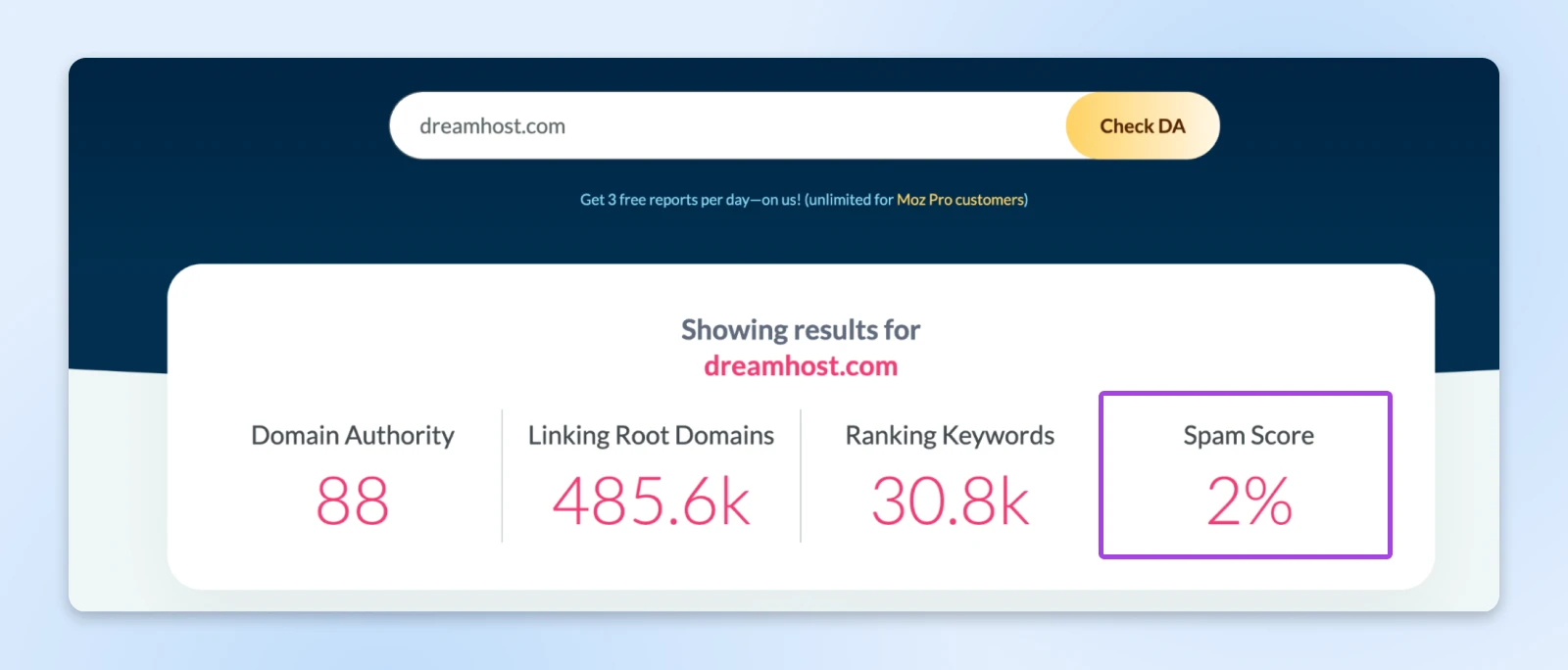
You could use Ahrefs or Semrush to check domains. With Moz, though, you get a spam score for every domain, which shows whether it has lots of spam links or has been used for spam-related activities.
Then, I run a Google index check using “site:domain.com” search to ensure it’s not blacklisted.
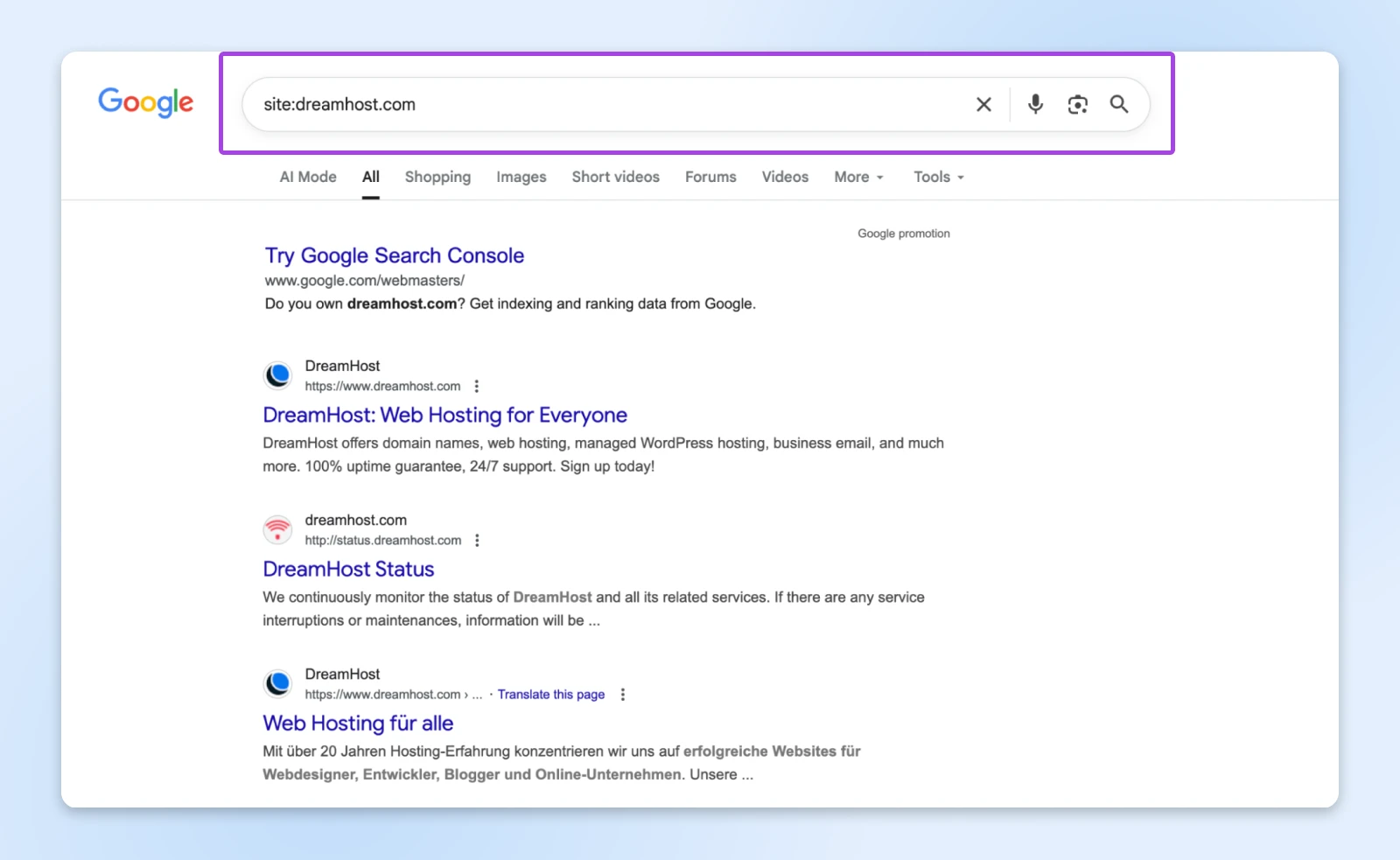
If the domain was removed from Google’s index entirely — the most severe manual action — you’ll see no results. Many penalties only demote pages, though, so an empty site: search is a warning sign, not a definitive diagnosis.
You can also review the Wayback Machine to see what content previously existed there.
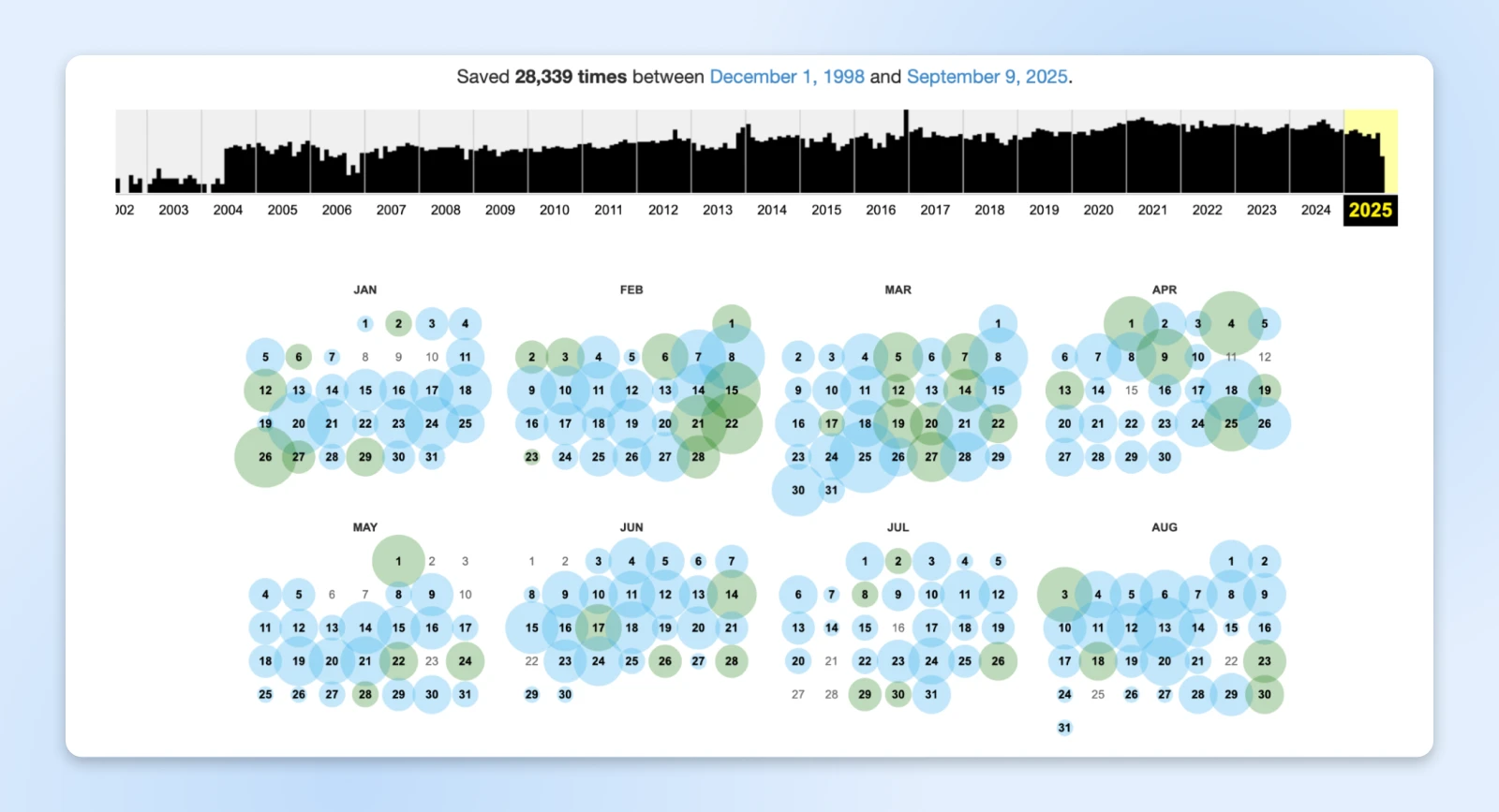
If a domain has been used for casino or gambling or any adult content, it’s going to be challenging to get your SEO going after the migration.
And before finalizing your choice, test the domain name with key stakeholders and some customers. Make sure it’s easy to spell, pronounce, and remember. If people consistently mistype it during testing, you risk losing the brand value that you worked so hard to create.
👉 Pro tip: Once you finalize a name, try securing related variations like common misspellings and alternative extensions. This small investment prevents competitors from capitalizing on your rebrand and protects against customer confusion.
Step 2: Document your current SEO assets
Make note of all your assets, including blog posts, pages, documents, products, and other media on your current domain. This becomes your reference point throughout the migration.
Then, identify your highest-value pages. If you get a lot of SEO traffic, you could sort pages by clicks and export the top 100 here. Don’t stop at the top performers, though. Your inventory should cover every URL with SEO value, including orphan pages that don’t show up in analytics or a crawl. Cross-check your backlink data and a “site:yourdomain.com” search to catch forgotten pages that still earn links or traffic.
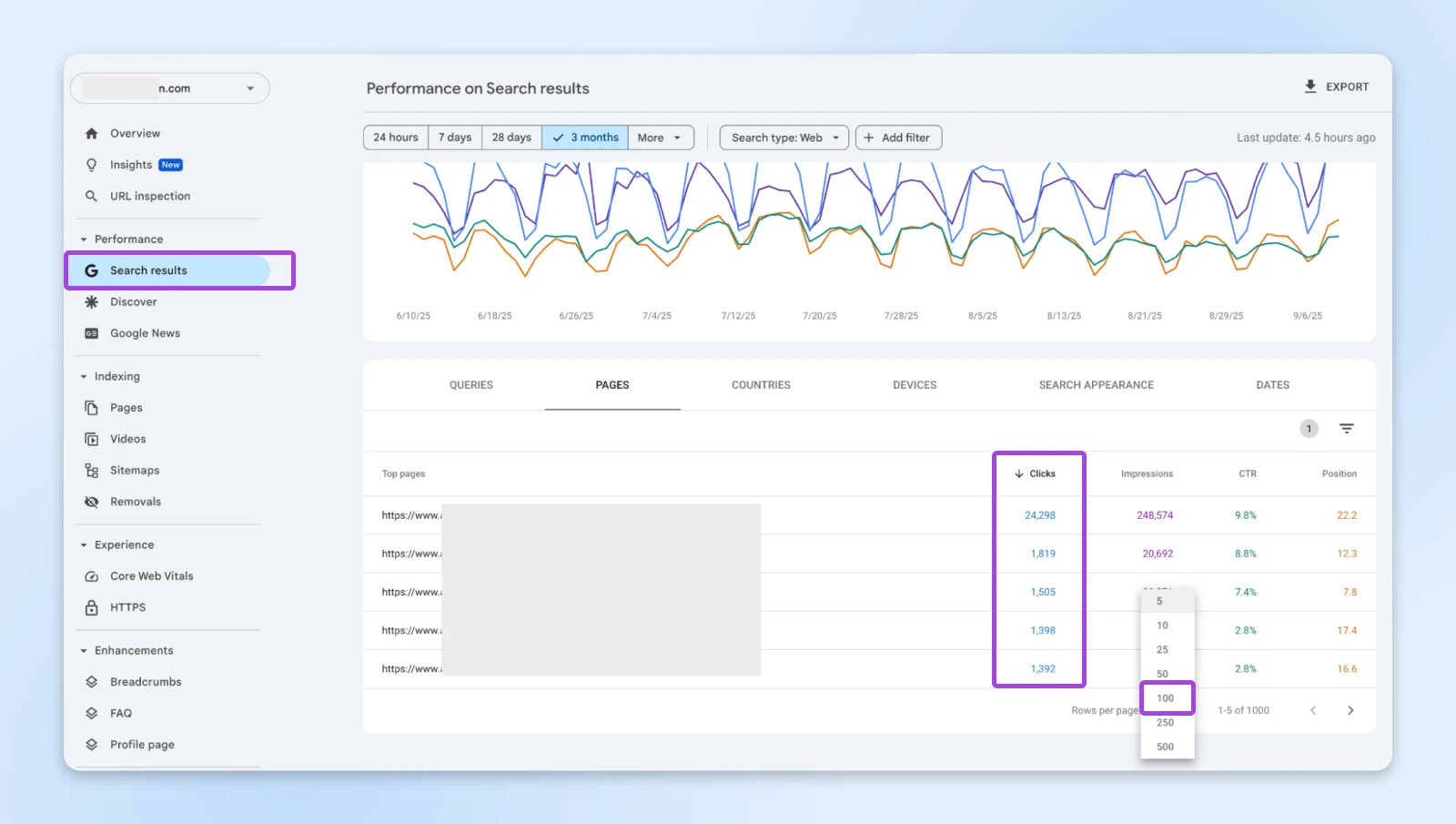
Alternatively, you can export the highest-performing pages as per your funnels in Google Analytics.
Next, catalog all technical elements:
- Your complete URL structure and sitemap
- All tracking codes and pixels that are currently installed
- Form destinations and automation workflows
- Schema markup and structured data
- Current Google Search Console settings and verifications
Create a complete backlink inventory using Ahrefs or similar tools. You’ll need this list to create 301 redirects from the pages on your domain to the new one after successful migration. Keep this documentation in a simple spreadsheet: old URL, new URL, and any special considerations.
Step 3: The technical migration
Set up a staging environment. Run the website migration to this staging environment first while your current site stays active.
On the staging site, verify:
- All pages load correctly with proper formatting
- Forms submit and route to the right destinations
- Automations are working fine
- Payment systems process transactions properly
- Analytics and tracking codes fire correctly
- SSL certificates are properly configured
Once you’ve verified these details, schedule the actual migration during your lowest traffic period to minimize any impact if issues arise. For most businesses, this is late evening or early morning hours in your primary market.
When you’re ready to migrate, follow this sequence:
- Take complete backups of both your files and database
- Move the website files and database over to the new domain hosting
- Most web hosts provide a temporary subdomain to view the website — check that out
- Once verified, update your DNS records to point to the new domain
- Immediately test critical pages and functionality
- Verify SSL certificates are active and working
- Confirm all tracking codes are firing properly
DNS
The Domain Name System (DNS) protocol keeps records of which domain names correspond to specific IP addresses. DNS enables you to browse the web by typing in regular URLs instead of IP addresses.
Read MoreHaving professional support during this phase is valuable. At DreamHost, we’ve seen hundreds of migrations go sideways because someone missed a critical redirect or forgot to update a tracking pixel.
That’s why our migration support team uses a detailed pre-flight checklist. Overkill? Maybe. But it’s the kind of thoroughness that keeps a missed redirect from becoming an SEO disaster.
Step 4: Implement URL redirects
Every URL from your old domain needs a 301 redirect to its corresponding page on the new domain.
The website map we created in step 2 will come in handy here. Otherwise, you can run a Screaming Frog scan on your old website to collect all the URLs.
The redirect structure should be:
- Old homepage → New homepage
- Each old product/service page → Corresponding new page
- Old blog posts → New blog posts at the same URL path when possible
- Any page without a direct equivalent → Most relevant new page
Whatever you do, don’t take the shortcut of redirecting every old URL to your new homepage. Redirects that dump visitors on an irrelevant page get treated as soft 404s, so the page-level link equity you built evaporates instead of transferring. Map URL to URL — it’s tedious, and it’s also the difference between a migration that recovers and one that doesn’t.
After implementing redirects, test the redirects systematically. I check at least 50–100 URLs manually to ensure they resolve correctly. This includes your highest-traffic pages, recent blog posts, and any pages with significant backlinks.
Then, update the internal links on your new site so they point directly at new-domain URLs instead of hopping through a redirect (navigation, footer, in-content links, and image sources all count). Run a fresh Screaming Frog crawl afterward to catch any stragglers still referencing the old domain.
Keep the redirects and your domain active indefinitely. You don’t want a competitor scooping up your expired domain after a year and redirecting your old traffic to their sites, essentially hijacking years of your brand equity.
The annual renewal cost is minimal insurance against losing established traffic sources.
👉 Important: Set up Google Search Console for your new domain immediately and use the Change of Address tool. This tells Google about your migration and speeds up the reindexing process.
What to do after your domain migration
After the cutover, your job shifts to monitoring and rebuilding: track your site metrics daily, keep investing in the new domain’s SEO, update everything that still points at the old domain, and expect the recovery timeline below.
Start tracking your site metrics
- 404 error monitoring: Check Google Search Console daily for the first 90 days to catch any missed URLs. Even with careful planning, you’ll inevitably miss some redirects, especially for old blog posts, archived pages, or seasonal content. Set up a weekly Search Console review to identify and fix new 404 errors immediately.
- Organic traffic recovery: Monitor daily organic sessions and compare to pre-migration baselines. There will be some initial drops, but look for steady recovery trends starting in weeks 2–4.
- Ranking preservation: Track your most important keyword rankings weekly. Well-executed migrations often see rankings return to previous levels within 60–90 days.
- Conversion rate stability: Monitor whether your traffic quality remains consistent. Sometimes migrations can initially attract different user types while Google is testing your domain.
- Technical health: Watch for increases in 404 errors, page load times, or crawl errors that could indicate technical issues.
Work on SEO for the new domain
Even with the 301 redirects and existing link juice, you still need to put in some work towards on-page and off-page SEO. That includes:
- Getting additional backlinks for your new domain
- Optimizing content to rank better
- Improving the internal linking
- Other SEO strategies you may apply to a new domain
It helps speed up traffic recovery since Google gets signals not only from the old domain but also from the additional effort you’re putting in to make the domain and content worth ranking.
Also update everything that still points at the old domain. Redirects catch the traffic, but stale references slow down how quickly search engines and customers consolidate on your new brand:
- Link reclamation: Ask your highest-value linking sites to point at the new domain directly — the backlink inventory from step 2 is your outreach list.
- Directories and profiles: Update business listings, directories, and social media profiles to the new URL.
- Announce the change: Publish a short page explaining the rebrand, and notify customers by email and social media before and after the cutover. Customer confusion is a migration risk you can simply write your way out of.
- Tracking and tools: Keep your existing Google Analytics property and Tag Manager container so you preserve your history, but update web-stream URLs, GA4 key events, cross-domain and referral settings, URL-based tags and triggers, and any third-party integrations that reference the old domain.
And remember to submit your new domain’s sitemap in Search Console. Temporarily keeping a sitemap of the old URLs submitted can help Google recrawl them and discover your redirects faster, but per Google’s site-move documentation, it’s optional — once the new sitemap is in, Google will use it.
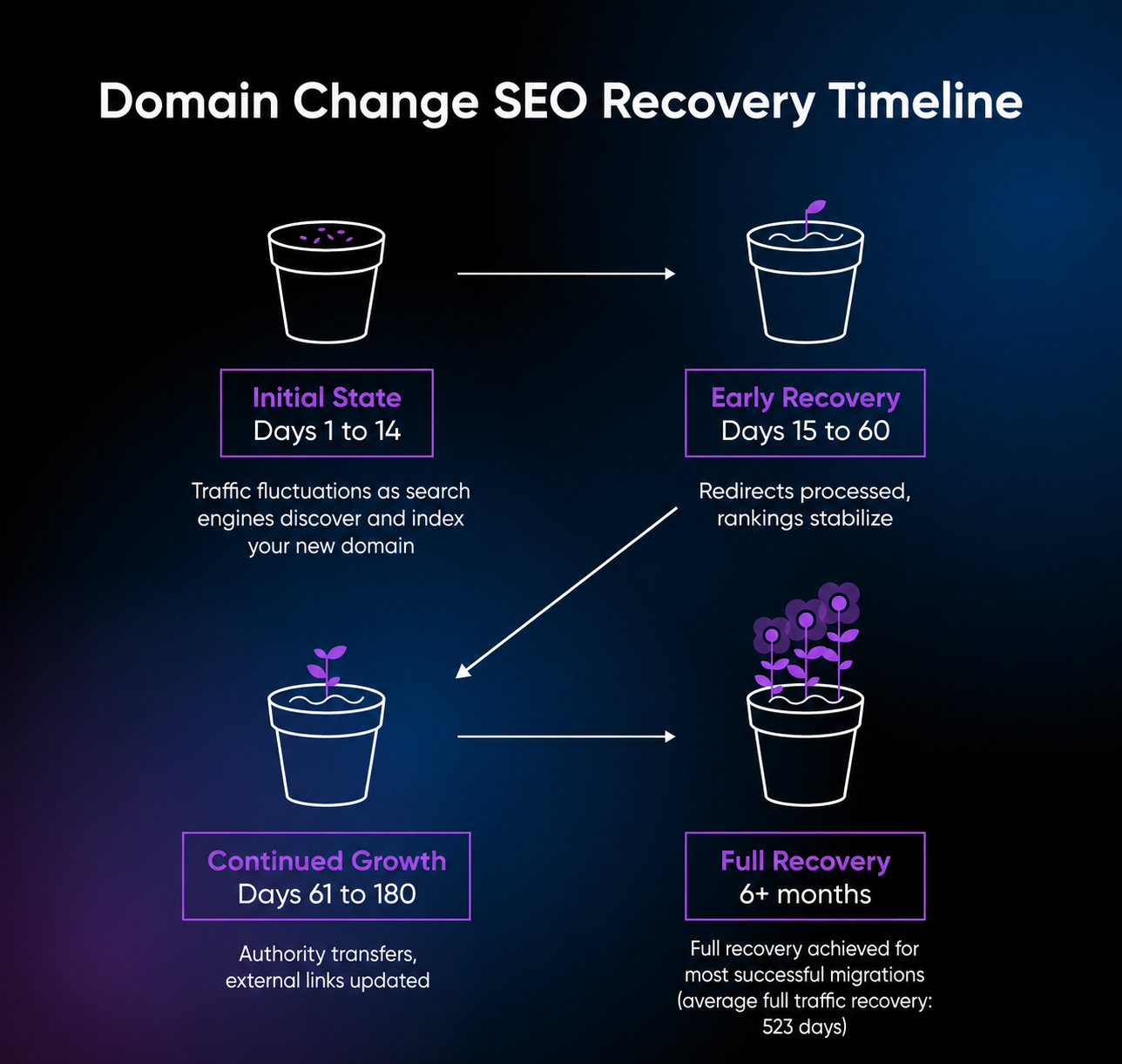
SEO timeline expectations after a successful domain migration
Based on some of the migration recovery patterns we’ve observed, you should expect the following.
- Days 1–14: Significant traffic fluctuations as search engines discover and index your new domain
- Days 15–60: Gradual traffic recovery as redirects are fully processed and rankings stabilize
- Days 61–180: Continued improvement as authority fully transfers and external links are updated
- 6+ months: Full recovery achieved for most successful migrations
What if your traffic doesn’t recover on schedule?
Diagnose before you panic — most stalled recoveries trace back to a fixable technical gap. Work through this list in order:
- Audit your redirects. Crawl your old URLs and look for redirect chains, broken redirects, and soft 404s. A redirect that lands on an irrelevant page passes no equity.
- Verify your Change of Address status. Search Console shows a move-in-progress notification for 180 days — confirm the move was actually submitted and passed its checks.
- Check internal links and canonical tags. Pages that still reference old-domain URLs send Google mixed signals about which site is canonical.
- Think hard before rolling back. A rollback is only worth considering in the first days after cutover, before Google has reindexed the new domain. Weeks in, reversing course is a second migration with all the same risks, so fixing forward is almost always the better play.
When to seek professional help
These domain migrations are high-stakes technical processes, and mistakes can cost months of recovery time. So you need to seek professional assistance sooner than you think.
Consider professional migration services when:
- Your site generates significant business revenue, and you can’t afford extended downtime
- You have a complex technical setup with custom functionality
- You’re migrating during peak business periods
- You’re combining the migration with other major changes (redesign, platform change, etc.)
DreamHost offers professional website migration that includes comprehensive site copying, security updates, and technical support throughout the process, with a full review step to confirm everything before your domain is switched over.
Domain change FAQs
How long does a domain migration take to complete?
The technical migration process typically takes 24–48 hours, but recovery of estimated organic traffic averages 523 days, per Search Engine Journal’s 2025 study. Most sites see initial recovery beginning within 2–4 weeks if you follow the best practices correctly.
Will I lose my search rankings during a domain change?
Usually not permanently, though nothing makes a migration risk-free. Drops in impressions are common in the first month. If you’ve followed every step (complete 301 redirects, Change of Address, updated internal links), rankings typically start recovering within a few weeks — but Search Engine Journal’s 2025 study put full recovery of estimated organic traffic at 523 days on average.
Do I need to update all my backlinks manually?
While 301 redirects will automatically pass link equity from old URLs to new ones, it’s worth reaching out to high-value linking sites to update their links directly. This helps with getting maximum authority transfer and eliminates any potential redirect chain issues. With AI search features tending to cite recognizable, well-linked brands, asking for a link update can help your new brand show up more.
What happens to my email addresses with the old domain?
Email addresses using your old domain will continue working as long as you maintain the old domain registration and email hosting. However, you’ll want to gradually transition to new email addresses with your new domain and update them across all business communications, signatures, and marketing materials.
How long should I keep my old domain active?
Forever. The annual renewal cost (typically $10–20 for a .com) is minimal insurance against competitors purchasing your expired domain and redirecting your old traffic to their sites. You don’t want to lose thousands in monthly revenue because you let your competitor scoop up your original brand domain.
Can you transfer SEO to a new domain?
Yes. Set up 301 redirects from every old URL to its new equivalent, submit the move through Google’s Change of Address tool, and keep the old domain registered. Rankings and link equity can transfer over weeks to months; complete URL mapping reduces the risk, but it can’t guarantee full recovery.
Your domain migration doesn’t have to be a nightmare
Remember that 2 AM panic when you first thought about changing your domain? That fear was rational. But now you’re armed with a battle-tested process that protects what you’ve built.
Domain migrations with a clear plan and an eye for detail signal to your audience (and search engines) that your brand is evolving with clear intention rather than by accident.
The metrics will jump around a bit — that’s part of the process. However, after you complete your domain migration, make sure to track your SEO recovery, regularly revisit your redirects, monitor your rankings, and communicate with your users. These practices will help keep your online reputation solid and your brand visible.
And remember, moving to a new domain is an opportunity to reinforce your identity, refresh your approach, and gain more control over your business’s future. So, set the groundwork for the results you want: healthy rankings, consistent traffic, and a brand that leaves a mark.

Your Great Idea Starts with a Domain Name
A custom domain gives your site a professional look, strengthens your brand, and helps visitors find you on the web.
See MoreDid you enjoy this article?