What Is a Custom Hook in WordPress?
A custom hook is an action or filter hook that a WordPress developer creates in a plugin or theme using do_action() or apply_filters(). Other code can then attach callback functions with add_action() or add_filter(), extending the plugin or theme without editing its files. Custom hooks are created and called exactly like WordPress core’s built-in hooks.
More About Custom Hooks
A custom hook works exactly like the hooks built into WordPress, with one difference: you define it. Fire it inside your own plugin or theme, and any other code on the site can attach a callback function to it, extending your work without editing your files.
The WordPress Plugin Handbook (last updated March 20, 2025) calls using custom hooks "an important, but often overlooked practice." They're what let other developers build on your plugin instead of hacking at it.
Creating a custom hook
Use do_action() to create an action hook and apply_filters() to create a filter hook. Custom hooks are created and called in exactly the same way as WordPress core's own hooks, and other code attaches callbacks to them with add_action() or add_filter().
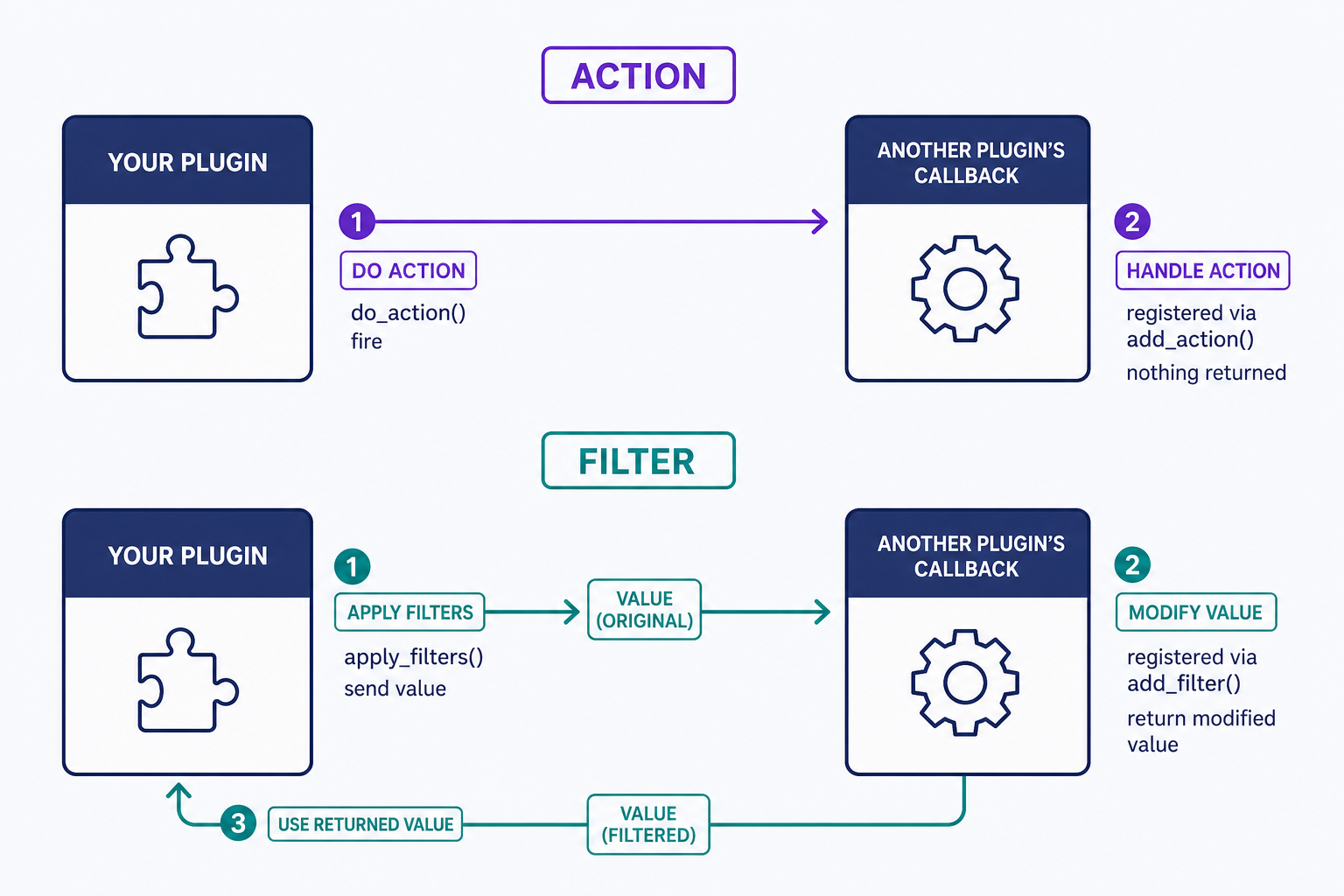
Say your plugin renders a settings page. Add do_action( 'myplugin_after_settings_page' ); at the end of it and you've created an extension point. Another developer can now call add_action( 'myplugin_after_settings_page', 'their_callback' ); to append their own fields to your page. Since they gave no priority, their callback runs at the default priority of 10.
A filter passes data through instead. Run $params = apply_filters( 'myplugin_post_type_params', $params ); and pass the resulting $params to register_post_type(). Any callback hooked to that filter can now modify the parameters before the post type is registered. The assignment matters: apply_filters() returns the filtered value, and your code has to use what comes back. Filter callbacks take the data, modify it, and return it; action callbacks don't need to return anything, and whatever they do return is ignored.
Custom hooks vs. core hooks
Mechanically, nothing separates them. Both kinds are fired with do_action() or apply_filters() and hooked with add_action() or add_filter(). The difference is who defines them and why: core hooks like init, wp_head, and the_content ship with WordPress so you can extend WordPress; custom hooks ship with your plugin or theme so other developers can extend you.
Why developers add custom hooks
Custom hooks let other people change your plugin's behavior without forking it, so their changes survive your updates. The Plugin Handbook's concrete advice: run apply_filters() on any text your plugin outputs to the browser, particularly on the frontend, so site owners can adapt the wording to their needs. The general rule is just as practical: add a hook at any point where another developer might reasonably want to inject or change something.
Avoiding naming collisions
The documented failure mode of custom hooks is the naming collision: two plugins pick the same hook name for different purposes, each triggers the other's callbacks, and the result is hard-to-find bugs. The Handbook's example is a filter named email_body, a name generic enough that several developers could choose it independently. The fix is a rule you can apply today: prefix every custom hook name with a unique string, such as your plugin name, your company name, or your WordPress.org handle.
Is a custom hook the same as a webhook?
No. Despite the similar names, they're unrelated technologies.
- A custom hook is PHP that runs inside a single WordPress site. It lets one piece of code extend another at a pre-defined spot, and no network traffic is involved.
- A webhook is an HTTP POST request that one application sends to another when an event happens, like a form service pushing each new submission to a marketing platform's API.
One extends code; the other connects apps. If app-to-app notifications are what you came for, webhook is the term to search.
Frequently Asked Questions
- Yes, that's the point. Any active plugin or theme can attach a callback to your hook name with add_action() or add_filter(). Registering is safe even when the hook never fires: add_action() always returns true, so if your plugin is deactivated, the callbacks simply never run.
- List extra arguments after the hook name, such as do_action( 'myplugin_order_saved', $order_id, $total ). The callback declares matching parameters, and add_action()'s fourth argument sets how many it accepts. The default is 1.
- An empty hook still adds a little dispatcher overhead each time it fires, but the attached callbacks are usually the real cost. If performance matters, profile hooks that fire frequently, like ones inside loops or on every request, before trusting that they're cheap.
- Search the plugin's source code for do_action and apply_filters, or check its developer documentation. Well-documented plugins publish a hook reference; for the rest, a code-editor search across the plugin folder turns up every extension point in seconds.
Powerful WordPress Hosting
Reliable, lightning-fast hosting solutions specifically optimized for WordPress. Find the perfect plan for you by clicking below.
WordPress Hosting Plans