What Is a Wireframe?
A wireframe is a two-dimensional illustration of a web page or app screen that shows where elements will be placed. Created early in the design process, a wireframe typically leaves out colors, images, and styling to focus on layout, content spacing, functionality, and intended user behavior.
More About Wireframes
Wireframes are bare-bones visual guides used early in website and app design. Most wireframes, especially early low-fidelity ones, skip colors, images, and decorative typography. High-fidelity wireframes tighten spacing and may carry real copy, but the visual styling stays restrained. The finished look belongs to the mockup. Either way, the point is structure: what goes on each page, and where.
Building a wireframe lets designers settle a site’s layout and navigation before anyone invests time in visual polish. It also forces decisions about space: how much content fits on one page, which elements get priority, and how much white space the page keeps. The same technique works for mobile app screens, not just web pages.
What a wireframe looks like
A typical homepage wireframe is a grayscale sketch made of boxes and lines. A header bar holds a small box labeled “logo” and a few short lines standing in for navigation links. Below that, a large rectangle with an X through it marks the hero image, with horizontal lines in place of the headline and intro text. Three equal boxes represent feature blurbs, and a plain strip closes out the footer. Anyone can read it at a glance, and nobody debates colors, because there aren’t any.
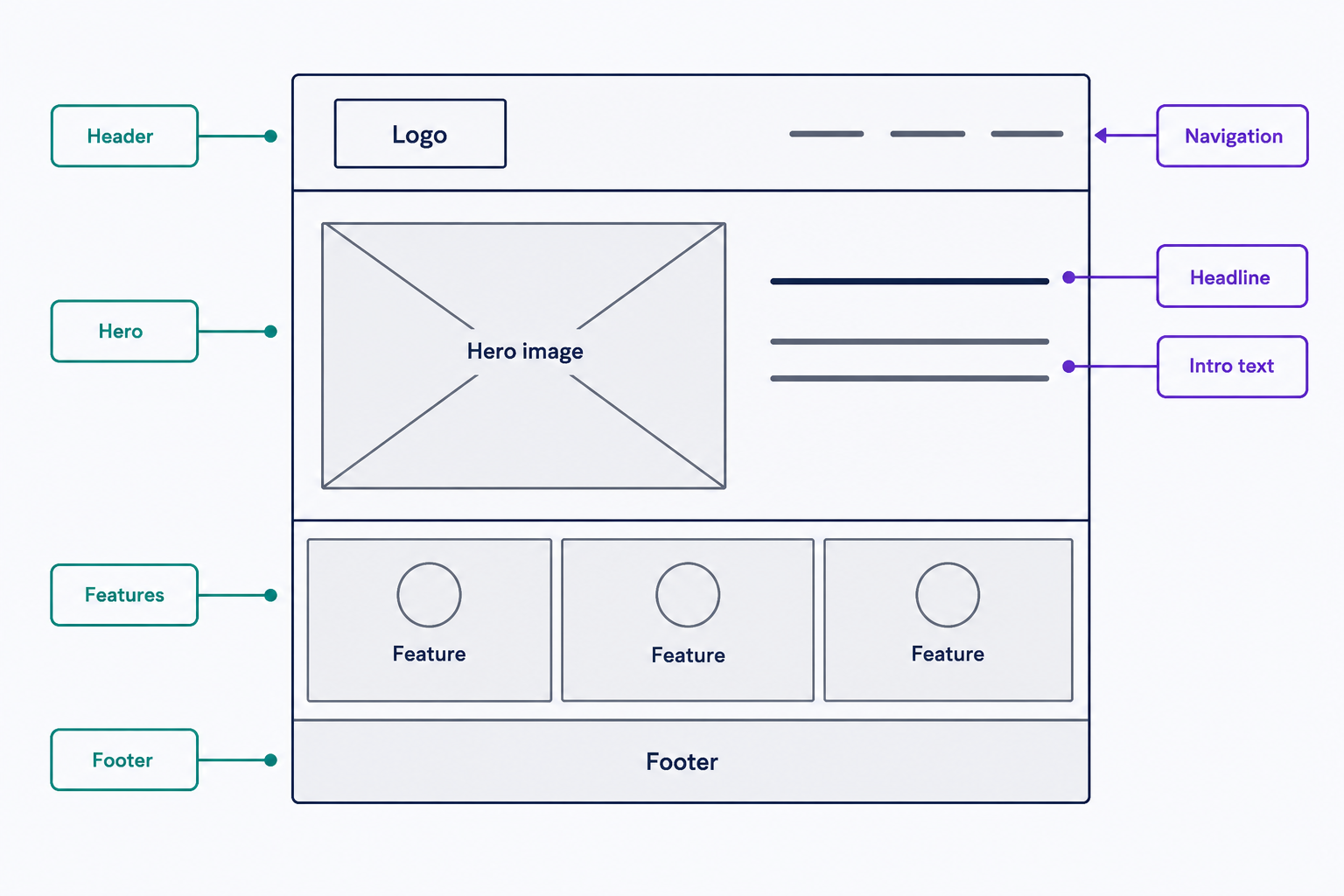
Fidelity is a spectrum:
- Low-fidelity wireframes are quick sketches: boxes, lines, and placeholder labels. Use them earliest, while ideas are still moving.
- High-fidelity wireframes come closer to real spacing and often carry real copy, but they stay visually plain rather than showing the finished design. Use them once the structure is agreed.
Start low fidelity, and add detail only when the structure stops changing.
Wireframe vs. mockup vs. prototype
The three usually run as a sequence: structure, then visuals, then behavior.
- A wireframe is a structural blueprint, usually low-fidelity. It settles layout, content hierarchy, and user flow, typically without colors or real imagery.
- A mockup is a static visual design that shows the finished treatment: color, typography, and images applied to the agreed structure.
- A prototype is an interactive, clickable simulation used to test how a design behaves before development starts. Prototypes can be low- or high-fidelity, from clickable wireframes to near-final screens.
The reliable tell is interaction: if you can click through the screens, you’re looking at a prototype, whatever its level of polish.
How to create a wireframe
List your pages and the path users will take between them first. Then sketch each page’s structure: boxes for images, horizontal lines for text, and labels for navigation and calls to action. Keep everything grayscale so feedback stays focused on layout. Once whoever owns the decision signs off, move on to a mockup.
Pen and paper is a legitimate wireframing tool, and often the fastest one. Dedicated tools like Figma and Balsamiq earn their place when a team needs to share, comment on, and revise the same wireframe. For a step-by-step walkthrough, read our guide, How To Wireframe a Website: The Guide for Non-Designers.
Why wireframes matter
A layout or navigation problem caught in a wireframe takes minutes to fix. The same problem caught after visual design means a redesign, and after development it means a rebuild. Wireframes are cheap insurance against expensive rework.
One failure mode to plan for: stakeholders who mistake a grayscale wireframe for an ugly final design. When you share one, say what it is and what feedback you need. The wireframe shows what goes where; colors and fonts come later. Wireframe the few page types that matter, get agreement, and then move to the mockup.
Frequently Asked Questions
- Not always. A 1-3 page site built on a ready-made theme has already had its layout decisions made for you. Wireframe when the layout is custom, the site has several distinct page types, or multiple people need to agree on structure before design work starts.
- Yes. Nothing about wireframing requires software. A pencil sketch photographed with your phone is a shareable wireframe, and a whiteboard works well for group sessions. Dedicated tools mostly buy you easier commenting and revision when a team works on the same file remotely.
- Usually a UX or web designer, but anyone planning a site can do it. Wireframing is about deciding what belongs on each page and where, not about drawing skill, so non-designers often sketch wireframes to brief a designer or agency.
Custom Website Design
Get a one-of-a-kind, mobile-friendly website that makes your brand truly shine. Share your vision with us and we'll take it from there.
Custom Web Design