What is phpMyAdmin?
phpMyAdmin is a free, open source tool written in PHP for administering MySQL and MariaDB databases through a web browser. It lets you create and manage databases, tables, indexes, users, and permissions, run SQL queries, and import or export data without writing commands at a terminal.
More About phpMyAdmin
Open phpMyAdmin and you can browse the tables inside a MySQL or MariaDB database, edit rows, build indexes, manage users and permissions, and download a full backup, all from a browser tab. It provides a point-and-click interface for common database operations, and still lets you run SQL queries directly when you need them.
Most web hosting control panels ship with phpMyAdmin: cPanel includes it by default, while Plesk offers it as an installable component. If your host doesn't provide it, you can download it free from the phpMyAdmin website.
How phpMyAdmin works
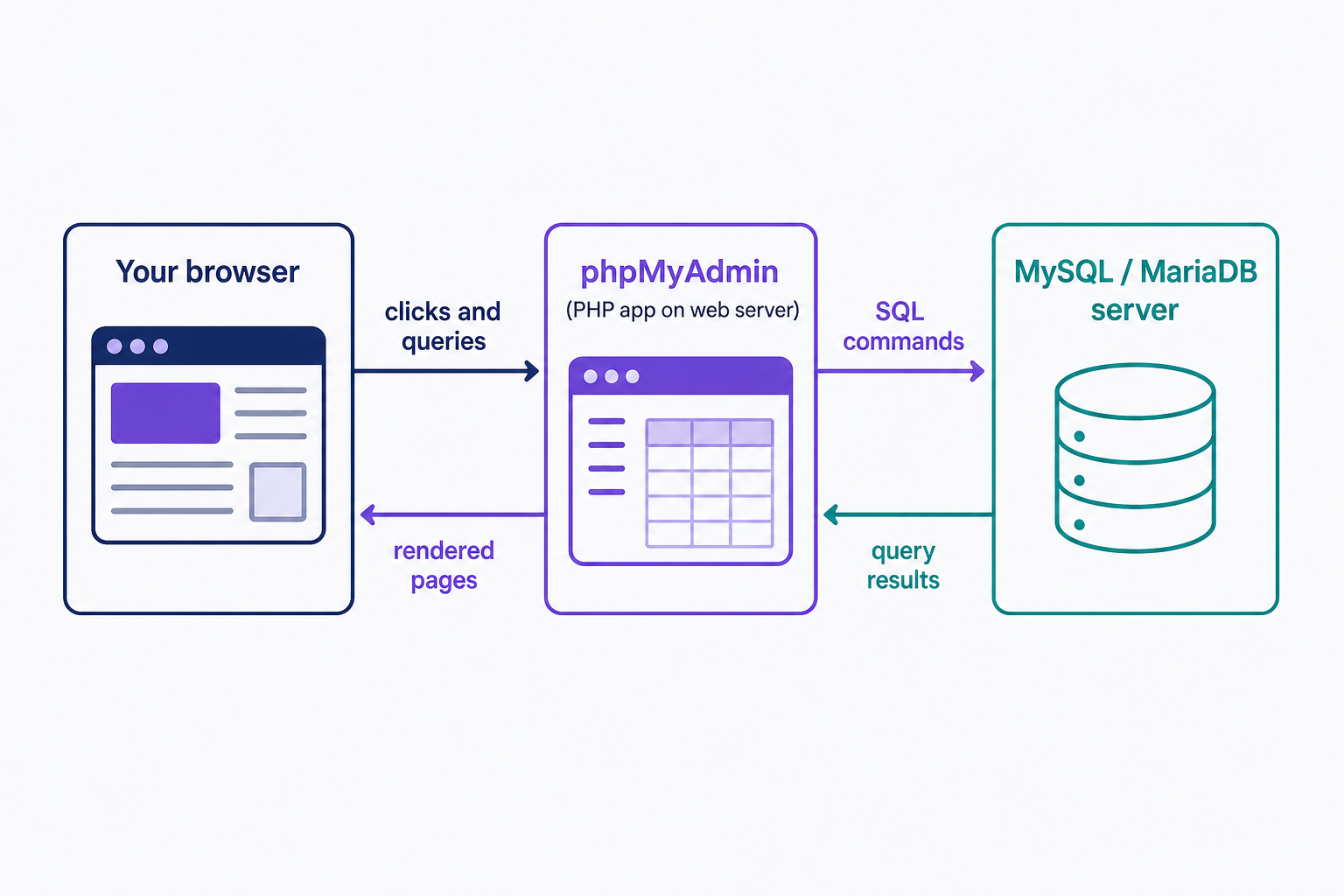
phpMyAdmin is a web application written in PHP, which is the "php" in the name. It runs on a web server, connects to a MySQL or MariaDB server, and renders your databases as pages you can click through. You sign in with the database's own credentials, not your hosting account login. The interface is translated into 97 languages, by the project's own count.
How to access phpMyAdmin
On a hosted site, start in your control panel. cPanel lists phpMyAdmin in its Databases section, and in the DreamHost panel, the MySQL Databases page shows a phpMyAdmin link beside each database hostname that opens the login page. A self-installed copy lives at a URL on your own server instead. Wherever you find it, log in with the database user's username and password.
phpMyAdmin vs. MySQL
They aren't alternatives; one manages the other.
- MySQL (or MariaDB) is the database server. It stores your data and answers queries from your applications.
- phpMyAdmin is a web interface for administering that server. It sends the commands you click or type.
You can run MySQL without ever installing phpMyAdmin. phpMyAdmin without a database server has nothing to manage.
Common tasks: backing up a database
The quickest way to learn phpMyAdmin is to export a backup. Select your database in the left column, open the Export tab, keep the Quick method with the SQL format, and click Go. Your browser downloads a .sql file containing the whole database, and the Import tab can restore it later.
The same interface lets you run and bookmark SQL queries, import data from CSV or SQL files, export to CSV, XML, or PDF, search across an entire database, and manage user accounts and privileges. Our guide to creating and managing MySQL users covers that last job step by step, and the official phpMyAdmin documentation covers everything from installation to configuration.
Where phpMyAdmin goes wrong
Three problems account for most phpMyAdmin trouble:
- Exposed login pages. A phpMyAdmin screen at a predictable public URL gets scanned and brute-forced constantly. Let your host manage access where you can, and keep any self-hosted copy on the current release: 5.2.3, from October 8, 2025.
- Failed imports. Big .sql files hit PHP's upload size and timeout limits. Compress the file, or import a very large database over SSH with the mysql command line instead.
- No undo. Row edits and DROP operations execute immediately. There is no recycle bin.
So export a backup before you change anything. It takes one click, and it's the only undo you get.
When to use something else
Use phpMyAdmin for quick, visual work on a hosted site: checking a value, editing a row, exporting a backup. Use the mysql and mysqldump command-line tools for very large databases and anything you want to automate. A desktop app like MySQL Workbench is better for schema design and heavier development work, and Adminer is a lighter, single-file alternative you can drop onto a server. If your host gives you phpMyAdmin in the panel, start there; it covers most jobs a site owner ever has.
Frequently Asked Questions
- No. WordPress talks to MySQL directly and never uses phpMyAdmin. It's handy for manual fixes, though: resetting a user password in the wp_users table or correcting a site URL in wp_options are both two-minute phpMyAdmin jobs.
- No. phpMyAdmin administers MySQL and MariaDB only. Control panels ship separate tools for other engines: Plesk, for example, pairs phpMyAdmin with a PostgreSQL equivalent. For Microsoft SQL Server, use a desktop client such as HeidiSQL or SQL Server Management Studio.
- Yes. Multi-server administration is a built-in feature: list each server in the config.inc.php configuration file and the login page offers a server choice. One copy can then manage several MySQL or MariaDB servers.
- Yes. It's open source, released under the GNU General Public License, and the project is a member of the Software Freedom Conservancy. There's nothing to license or subscribe to, even for commercial sites.
Web Hosting
Our Web Hosting plans offer a user-friendly interface and flexible options to fit your needs, with a 30-Day Money-Back Guarantee.
Web Hosting Plans