What Is Debugging?
Debugging is the process of finding and fixing errors, or bugs, in software. Developers reproduce the problem, isolate the faulty code using tools such as debuggers, error logs, or breakpoints, apply a fix, and then retest to confirm the fix works without breaking anything else.
More About Debugging
You can debug by hand, reading code and adding log statements, or with a debugger: a tool that pauses a running program so you can step through it line by line and inspect its state. Debuggers work anywhere software runs, from a web server to the microcontroller in an embedded system. Developers use them to trace bugs in their own code. Quality assurance (QA) testers use debuggers too, pinpointing and reporting errors in the software they're testing so developers can fix them.
The debugging process
Debugging follows a repeatable sequence. IBM's overview of debugging breaks it into 6 steps:
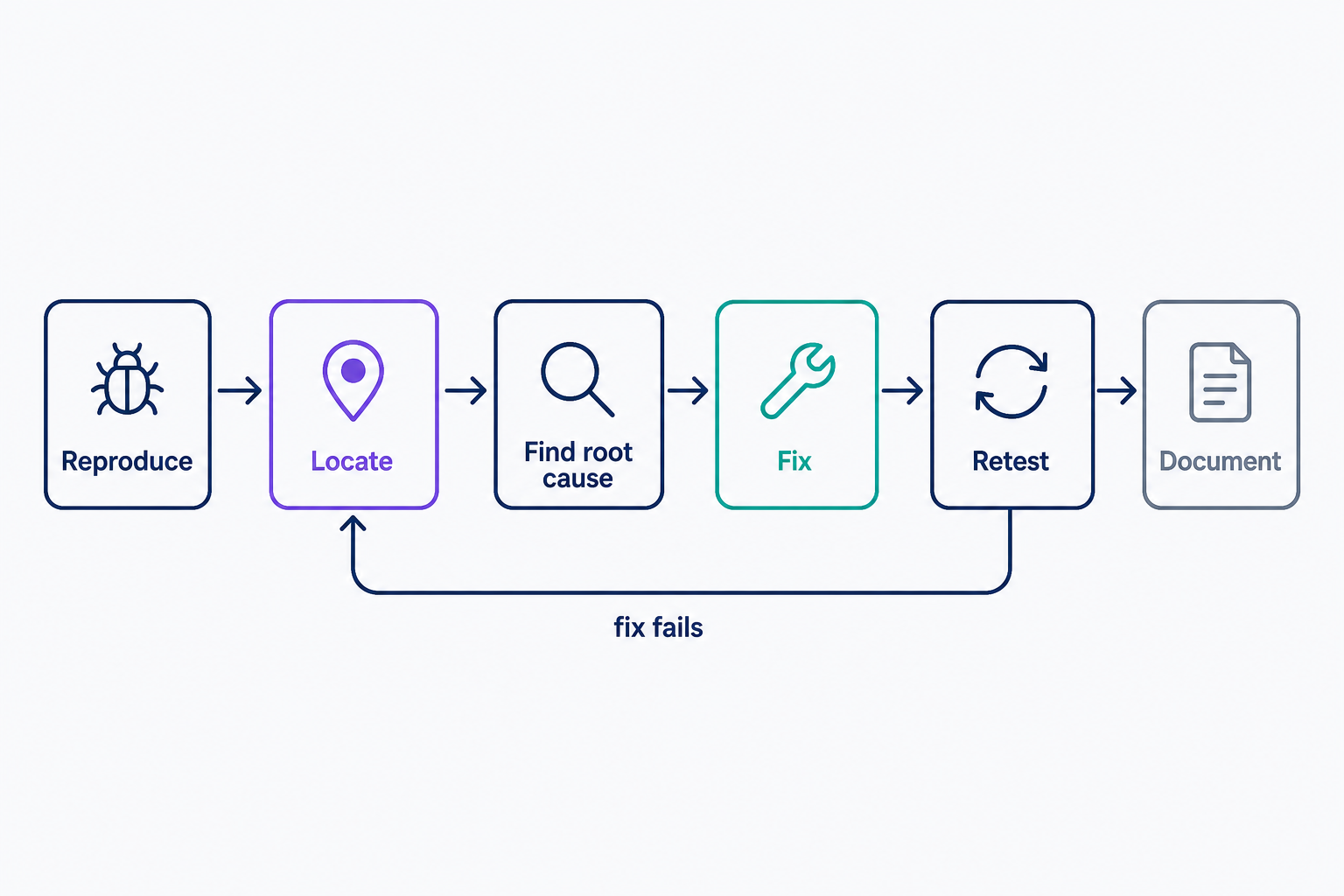
- Reproduce the conditions that trigger the bug, so you can watch it fail firsthand.
- Locate the bug by reading the code and reviewing your error logs.
- Determine the root cause, not just the symptom.
- Fix the code.
- Retest to confirm the fix works and hasn't introduced a new bug.
- Document what caused the bug and how you fixed it, for the next person who hits it.
The order matters. A fix applied before you understand the root cause usually patches the symptom and leaves the bug in place.
Debugging vs. testing
Testing and debugging are different jobs, and they usually belong to different people:
- Testing proves that a defect exists. It's typically QA's work, and it ends with a bug report, not a fix.
- Debugging traces that defect to its root cause in the source code and resolves it. That's typically the developer's work.
Testing brackets debugging on both sides: tests surface the bug first, and tests validate the fix afterward.
Common types of bugs
Most bugs fall into 3 broad types:
- Syntax errors: a missing parenthesis or semicolon stops the code from running at all. They're usually quick to find, and our guide to fixing syntax errors in WordPress walks through the most common case.
- Logic errors: the code runs but produces the wrong result, like a cart that applies a 10% discount instead of 15%. Nothing crashes, which is exactly what makes them hard to spot.
- Runtime errors: failures that appear only while the program runs, such as a request for a file that doesn't exist or a script that runs out of memory.
A fourth type, the semantic error, describes code that runs but produces no meaningful output.
Debugging tools
Most debugging tools cost nothing:
- Browser DevTools: every major browser ships a built-in JavaScript debugger. Press F12 and check the Console for errors.
- Xdebug: the free, open source debugger for PHP, the language WordPress runs on.
- GDB: the GNU Project's free debugger for compiled languages such as C and C++.
- Error logs and print statements: no installation at all, and enough for many everyday bugs.
Paid debugging tools are a niche, mostly hardware probes for embedded devices. Nothing a website owner needs comes with a price tag.
How to debug a WordPress site
WordPress ships with a built-in debug mode. Add 3 lines to your site's wp-config.php file, above the line that reads /* That's all, stop editing! */:
- define( 'WP_DEBUG', true ); switches debug mode on.
- define( 'WP_DEBUG_LOG', true ); saves every PHP error, notice, and warning to wp-content/debug.log.
- define( 'WP_DEBUG_DISPLAY', false ); keeps those messages out of your visitors' browsers.
Reproduce the problem, then read debug.log: it names the exact file and line that raised each error. The WordPress Advanced Administration Handbook (updated July 7, 2025) recommends debug mode for staging and local installs only, so turn it off on a live site once you have your answer. Then fix what the log found, starting with our walkthrough of 18 common WordPress errors.
Frequently Asked Questions
- From a real insect. On September 9, 1947, the team running Harvard's Mark II computer taped a moth found in a relay into their logbook: "First actual case of bug being found." Grace Hopper made the story famous, though "bug" had meant a technical fault since Edison's day.
- Yes. Print or log statements and your server's error logs handle most everyday bugs, and they're free. A stepping debugger pays off when you need to pause the program and inspect its state mid-execution, or when logs alone can't explain the failure.
- Troubleshooting diagnoses problems anywhere in a system: a server, a network, or a WordPress install with a misbehaving plugin. Debugging is narrower. It traces a defect to specific lines of code and fixes them. Troubleshooting often ends where debugging begins: with the faulty code identified.
- Not for the first steps. Reading an error message, checking a log file, and deactivating plugins one at a time to find a conflict need no code. Fixing the faulty code itself usually does, which is where a developer comes in.
Web Hosting
Our Web Hosting plans offer a user-friendly interface and flexible options to fit your needs, with a 30-Day Money-Back Guarantee.
Web Hosting Plans